

Quick Answer
If a pulse oximeter for seniors is not working well during hip replacement recovery, the most common reason is not the device itself but poor signal from cold fingers, slight movement, or incorrect placement. Try warming the hands, placing the finger fully and centered in the sensor, and holding very still with the hand supported at heart level for 30 to 60 seconds.
Why This Happens
Recovery after a hip replacement often means more time sitting or lying down, less movement, and sometimes swelling in the lower body. Hands may be cooler than usual, and circulation to the fingertips can be reduced, which makes it harder for a fingertip sensor to pick up a steady pulse signal.
Always check with a healthcare provider or physical therapist before making changes to monitoring or daily routines during hip replacement recovery. This is general household and product guidance, not medical advice, and your care team can advise what is appropriate for your situation.
Other common causes have nothing to do with recovery itself. Bright overhead light shining into the sensor, dark nail polish or acrylic nails, pressing the finger hard against the bottom of the clip, or tremor and small hand movements can all lead to dashes, fluctuating numbers, or a reading that disappears quickly.
Fit also matters. A clip that is too loose, too tight, or placed on a finger that is very small, swollen, or calloused may not align the light and sensor correctly. If you are caring for someone with arthritis or limited hand strength, you may also find it hard to keep the finger centered without support, which is a frequent reason for inconsistent results. For related guidance on comfort and fit, you may find best pulse oximeter for seniors with arthritis helpful.
Practical Steps to Try
- Warm and prepare the hand first. Have your loved one sit upright if allowed, rest for a few minutes, and warm the hands by rubbing them gently or holding a warm blanket. A warm, relaxed hand with good circulation gives a stronger signal than a cold, tense hand, and resting briefly may help reduce a rapid heart rate from recent movement.
- Place the finger correctly and support the arm. Slide the middle or index finger all the way into the oximeter so the pad of the finger is centered over the light, with the nail facing up. Keep the hand still at heart level, resting on a table or pillow, and avoid talking or moving during the measurement. Try not to press down or squeeze the clip, and shield the sensor from direct sunlight or bright lamp light with your other hand if needed.
- Remove barriers and try another finger. Gently remove dark nail polish, artificial nails, or anything covering the nail if you can, and make sure the finger is clean and dry. If one finger gives a weak or unstable reading, try the middle finger of the other hand. Some caregivers find that a different finger or hand provides a steadier result, especially if one hand is cooler or has swelling.
- Check the device basics. Confirm the batteries are fresh and inserted correctly, clean the inside of the clip with a soft dry cloth, and make sure the display is set to a brightness and orientation you can read easily without moving the hand to see it. If the reading still fluctuates, remove the oximeter, wait a minute, and try again rather than watching numbers bounce while adjusting the finger.
- Look for signal quality cues and keep a simple log. If your oximeter has a plethysmograph waveform or Perfusion Index, a steady wave and a higher Perfusion Index often suggest a more reliable signal, while a very low or erratic wave suggests you should reposition and try again. Write down the time, which finger you used, and whether hands were warm or cold, so you can share a clear pattern with the care team instead of a single number. You can learn more about steadiness and positioning in best pulse oximeter for seniors with balance issues.
When a Product Can Help
If you have tried warming, repositioning, and checking batteries and still get frequent dashes or unstable numbers, a model designed to highlight signal quality can be a practical next step. Features such as a plethysmograph waveform and Perfusion Index may help you tell whether the sensor is getting a steady pulse, while a clear OLED display with multiple viewing angles and an audible pulse beep can make it easier to use without shifting the hand. For broader context on monitoring at home, see Health Monitoring Devices.
This guide contains affiliate links, and we may earn a commission if you buy through them, at no extra cost to you.

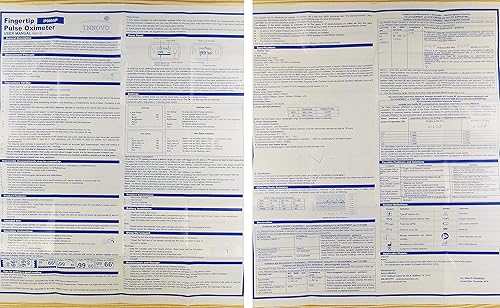
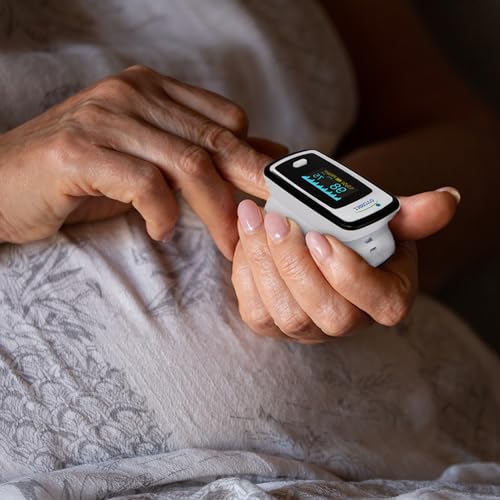
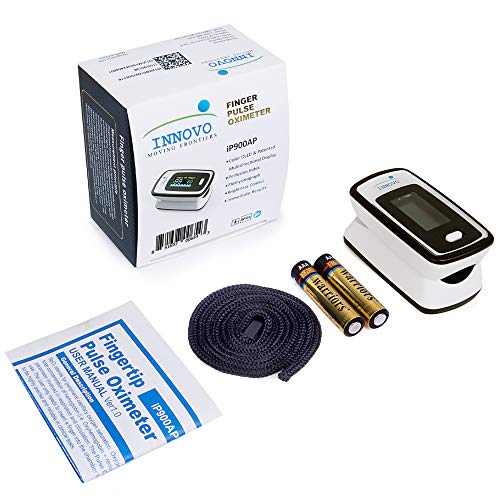
Prime Innovo iP900AP Deluxe Fingertip Pulse Oximeter







As an Amazon Associate we earn from qualifying purchases. Product prices and availability are accurate as of the date/time indicated.
The Innovo Deluxe iP900AP Fingertip Pulse Oximeter is one option caregivers consider because its description highlights an improved sensor for low perfusion, a plethysmograph and Perfusion Index to help confirm reliability, and an OLED screen with six display directions plus adjustable brightness and alarm features. These are convenience and usability features, not medical benefits, and they do not replace guidance from a clinician about what readings mean for your loved one.
When to Talk to a Professional Instead
A home oximeter is not a good fit for answering medical questions, and it is not ideal for situations where readings are consistently low, unusually variable, or paired with new symptoms. If you notice persistent difficulty getting any reading, ongoing low oxygen numbers, increased swelling, chest discomfort, shortness of breath, confusion, or fever during hip replacement recovery, contact a physician, healthcare provider, or physical therapist promptly rather than trying to troubleshoot the device further.
This is also the right time to seek professional input if your loved one has fragile skin, severe arthritis, very poor circulation, or cannot keep the hand still enough for a stable measurement. A clinician or occupational therapist can suggest alternative monitoring approaches, check whether another type of device is more appropriate, and review safe positioning after surgery.
For general home safety during recovery, you can also explore related supports such as large display BP monitors for elderly with hearing loss and discuss with the care team which tools actually add value at home and which may not be needed.
Frequently Asked Questions
Why does the pulse oximeter show dashes or no number after hip replacement?
Dashes often mean the sensor is not getting a steady pulse signal. Cold fingers, movement, an off-center finger, or bright light leaking into the sensor are common reasons, so try warming the hand, centering the finger, and holding still with the hand supported.
Can swelling, cold hands, or nail polish affect accuracy for elderly users?
Yes, these factors may make it harder for the light sensor to detect a consistent pulse. Warming the hands, trying a different finger, and removing dark polish or artificial nails when possible are simple steps that often help the device pick up a steadier signal.
What should I do if readings keep changing or seem too low?
Reposition and try again after a short rest, and note whether the plethysmograph or Perfusion Index looks steady if your model has those features. If numbers remain unstable or low, or if your loved one has new symptoms, contact a healthcare provider right away for guidance.
Browse more picks in our Health Monitoring Devices category, or see our related guide on Medline Bed Wedge Pillows for Elderly Support in 2026.







Write Your Review
No reviews yet. Be the first to share your experience!