

Quick Answer
If your pulse oximeter for seniors is not working well for a senior with hearing loss, the problem is often not the sensor but that you are relying on sound cues you cannot hear. Switch to visual confirmation instead: use a bright, rotatable OLED display, watch the plethysmograph waveform and perfusion index for a strong signal, and keep the hand still and warm while the reading settles.
Why This Happens
Many fingertip oximeters use beeps to signal a pulse is found, a reading is complete, or the battery is low. If hearing is limited, those cues are easy to miss, so you may remove the finger too early or not notice a low battery warning that leads to dim or unstable numbers.
Visual design matters just as much. A small, dim, or fixed-direction screen can be hard to read in low light or from a caregiver’s angle, and subtle error messages are easy to overlook. Without a clear visual signal that the device has a good pulse, you may get blank screens or fluctuating numbers.
Other common causes have nothing to do with hearing. Cold hands, movement during measurement, nail polish or acrylic nails, poor finger placement, and weak batteries can all cause inconsistent or no reading. For seniors, reduced circulation and thinner skin can also make it harder for any sensor to lock on quickly.
Dry skin, calluses, or a finger that is too small or large for the clip can reduce contact as well. When the fit is loose, the sensor may lose the pulse signal and you might think the device is faulty, when it simply needs better positioning and a steady hand.
Practical Steps to Try
- Make the reading visual first. Choose a well-lit spot, increase display brightness if your model allows it, and rotate the screen so both the senior and caregiver can see it without bending. Watch for a steady waveform or bar graph and a stable number for several seconds instead of listening for a beep. If you use other health devices, similar visual strategies help, as with large display BP monitors for elderly with hearing loss.
- Check placement and stillness. Place the fingertip fully into the clip with the nail facing up, keep the hand at heart level and resting on a table, and stay still and quiet while it measures. Try the middle or ring finger if the index finger gives a weak signal, and avoid talking or moving during the 5 to 10 second window.
- Warm the hand and clear the nail. Rub hands together gently or hold a warm washcloth for a minute before measuring, and remove dark nail polish or press-on nails. Trim very long nails so the finger sits flat. These simple changes often improve signal strength without any new device.
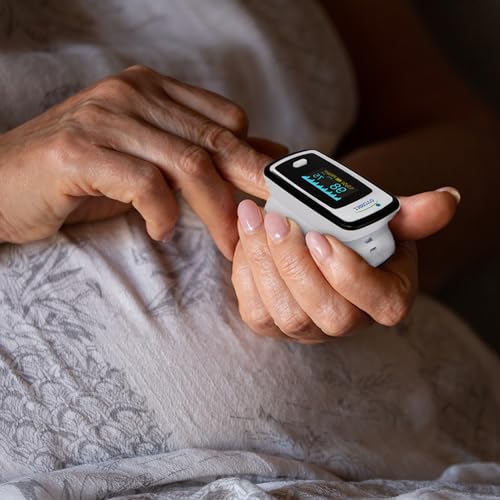
- Use the perfusion and waveform indicators if available. A perfusion index and plethysmograph waveform can show whether the device is getting a strong, regular pulse. If the waveform is jagged or the perfusion value is very low, reposition the finger, try another finger, or warm the hand and try again once.
- Build a simple, repeatable routine. Measure at the same time of day, seated and rested for a few minutes, and write down the oxygen saturation and pulse rate with the date and time. Keep spare AAA batteries nearby and replace them when the display dims. For ideas on easier handling, see pulse oximeters designed for arthritis-friendly use and options that support hearing needs for context on comfort features.
When a Product Can Help
A product change is worth considering when you have tried placement, warmth, stillness, and lighting, but you still cannot see results clearly or confirm a good signal without sound. In that case, one common option is to choose a model built around visual clarity and signal feedback rather than audio alerts.
This guide contains affiliate links, and we may earn a commission if you buy through them, at no extra cost to you.

Prime Innovo iP900AP Deluxe Fingertip Pulse Oximeter







As an Amazon Associate we earn from qualifying purchases. Product prices and availability are accurate as of the date/time indicated.
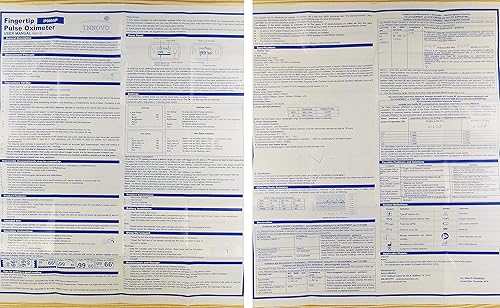
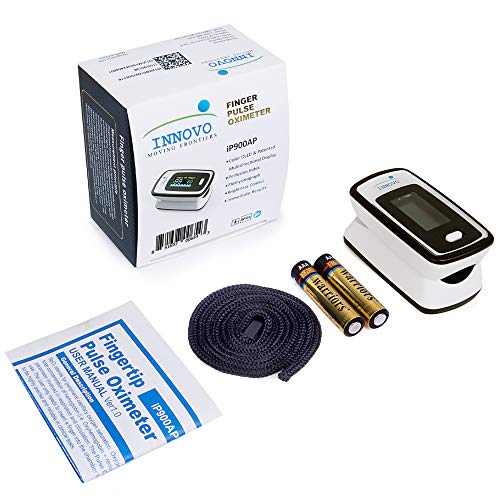
The Health Monitoring Devices category includes the Innovo Deluxe iP900AP Fingertip Pulse Oximeter, which according to its description offers a high quality OLED screen with six multidirectional display choices and adjustable brightness, plus a plethysmograph and perfusion index to help confirm a reliable reading visually. It also includes an auditory alarm and pulse beeps, but the visual indicators allow you to rely on sight rather than sound, and it comes with AAA batteries and a lanyard for convenient everyday use.
When to Talk to a Professional Instead
Home adjustments and a clearer display can help with usability, but they do not replace clinical guidance. If readings are consistently low, fluctuate widely, or do not match how the senior feels, contact a physician, healthcare provider, or home health nurse promptly and bring your written log.
This visual-first approach is not ideal for seniors who have chronic lung or heart conditions, experience frequent shortness of breath, chest discomfort, confusion, or bluish lips or fingertips, or who need continuous monitoring. It is also not a good fit if the senior cannot keep a hand still, has significant tremor, or has very poor circulation that makes fingertip readings unreliable, in those situations ask a healthcare provider about more suitable monitoring options.
Do not try to diagnose the cause of low oxygen or change oxygen use on your own. A doctor or respiratory therapist can advise on when and how often to measure, what range to watch for that individual, and what to do if numbers are outside that range. For broader safety planning, your Caregiver Corner resources can help you organize questions to bring to the appointment.
Frequently Asked Questions
Why does our oximeter seem to work but we miss the result? Many models signal a completed reading with a soft beep and then clear the screen quickly. If you cannot hear the beep, you may look away too soon. Try watching the waveform until the numbers hold steady for several seconds, and use a rotatable display so the result faces you.
How can we know a reading is reliable without sound cues? Look for visual stability. A smooth, repeating waveform and a perfusion index that is not extremely low suggest a stronger signal. If the waveform is erratic or numbers jump, reposition the finger, warm the hand, and try again while keeping the hand still.
What if the screen stays blank or shows dashes? Check the basics first: finger fully inserted, hand warm and still, no dark polish, and batteries fresh. Try another finger and make sure the clip closes gently but fully. If it still shows no value after two or three calm attempts, note what you tried and ask a healthcare provider or pharmacist for guidance on next steps.
Browse more picks in our Health Monitoring Devices category, or see our related guide on Medline Bed Wedge Pillows for Elderly Support in 2026.








Write Your Review
No reviews yet. Be the first to share your experience!