

When you have hearing loss, a tiny toggle or a faint click is not enough feedback to know the lights actually responded. You need a switch with a large, easy-to-press surface, a clear visual cue, and simple control that does not rely on hearing a beep or a chime.
This guide contains affiliate links, and we may earn a commission if you buy through them, at no extra cost to you.
Quick Picks at a Glance
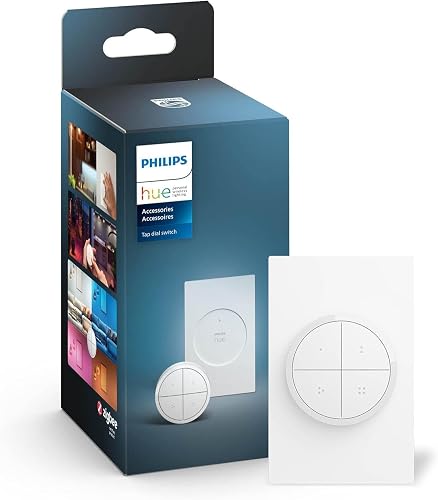
Prime Philips Hue Tap Dial Switch White

Prime Philips Hue Smart Button Wireless Switch

Prime Tapo S200D Smart Button Wireless Dimmer Switch

LANBON L10 Smart Light Switch with Large LCD

Flaygo GM-915T Rechargeable Hearing Aid
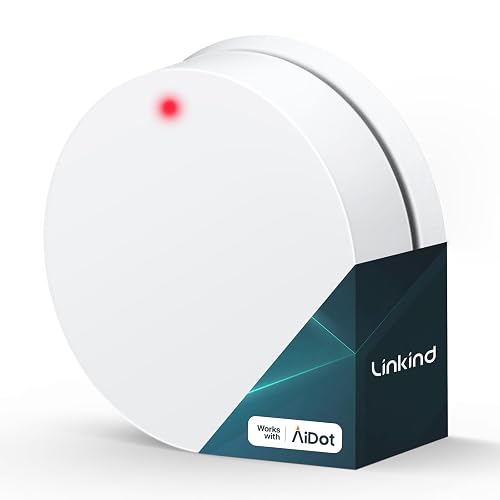
Prime Linkind Bluetooth Remote Light Switch for AiDot

Prime SwitchBot Smart Switch Button Pusher Bluetooth

Prime Aqara Smart Light Switch H2 4-Button 3-Channel

AuyeeHear Bluetooth OTC Hearing Aid for Seniors
As an Amazon Associate we earn from qualifying purchases. Product prices and availability are accurate as of the date/time indicated.
Pros
- Versatile 3-in-1 design works as wall switch, remote, and magnetic mount
- Smooth and responsive dial with speed-sensitive dimming control
- Four buttons each customizable to different rooms, zones, or scenes
- Clean matte design in white that blends into any decor
- Reliable Zigbee and Matter connectivity without using WiFi bandwidth
Cons
- Requires a Hue Bridge for full features, automations, and remote access
- Powered by CR2032 battery that will need periodic replacement
- Only compatible with Philips Hue and Matter devices, not a replacement for standard wired switches
The Philips Hue Tap Dial Switch is a wireless, battery powered controller built for Philips Hue users who want physical lighting control without rewiring. It is perfect for families and shared households where not everyone wants to rely on an app to change scenes or brightness.
In daily use, the four programmable buttons let you trigger different scenes, rooms, or zones with a single press, while the rotary dial makes dimming intuitive. Turn slowly for precise, gradual adjustments or spin quickly to brighten or dim a room instantly, giving you fast and natural control.
The design is minimal and modern with a matte white finish and compact plastic housing that looks great on any wall. It mounts with adhesive backing, detaches to work as a handheld remote, and can stick to metal surfaces, so you can place it anywhere without tools or wiring.
The main limitation is the Hue Bridge requirement for automations, out of home control, and stable Zigbee performance, which adds cost if you do not already own one. As a battery device it needs occasional CR2032 replacements, and it cannot directly control non-smart or non-Matter bulbs.
Overall, the Tap Dial Switch is one of the most flexible Hue accessories for adding tactile, customizable control. If you already use Hue and want convenient, app-free lighting control for the whole home, it is a highly recommended upgrade.
Connectivity: Zigbee, Matter compatible, requires Hue Bridge for automations and remote access. Control type: Push button with rotary dial, 4 programmable positions.
Power and Mounting: 3V CR2032 battery included, wall mount with adhesive, portable remote use, magnetic attachment to metal surfaces. IP20, for indoor use.
Compatibility: Philips Hue devices and Matter compliant smart home devices. Supports control of different Rooms or Zones per button.
Dimensions and Build: 5.87 x 3.43 x 2.87 inches, 9.07g, plastic body with metal contacts. Color White, also available in Black. Model 046677582036, Part Number 578807.
Certifications and Warranty: CE, ETL, REACH, RoHS, WEEE certified. 2 year manufacturer warranty from Signify North America Corporation.
Pros
- Intuitive single button operation with tap, multi press scene cycling, and hold to dim
- Reliable Zigbee connectivity via Hue Bridge that reduces WiFi congestion
- Compact, minimalist white design that blends easily into any room
- Highly customizable in the Hue app for rooms, zones, scenes, and automations
- Truly portable with versatile adhesive and magnetic mounting options
Cons
- Requires Philips Hue Bridge to unlock full features, adding cost for new users
- Button can fit loosely on its magnetic base and may fall off if bumped
- Single button offers less direct scene control than multi button Hue switches
The Philips Hue Smart Button (Model 605774) is a portable, battery powered wireless switch made for Hue Bridge users who want instant physical control without an app or voice command. It is ideal for nightstands, bathrooms, hallways, and entryways where fast, tactile lighting control is most useful.
In everyday use it is quick and dependable, with a single press to power lights on or off, repeated presses to cycle through up to 10 time based scenes, and press and hold to dim or brighten smoothly. The default time based light adjusts color and brightness to suit the time of day, while the Hue app lets you assign rooms, zones, and automations to start or stop with one touch.
Design is clean and minimalist, measuring just under 3 inches square in matte white plastic with a soft, responsive button. Installation is completely wire free using the included adhesive mount, which also doubles as a magnetic holder so you can place the button on walls or any magnetic surface and move it as needed.
The main drawback is the requirement for a Hue Bridge to access the full feature set, which is an extra investment if you are new to the Hue ecosystem. Some users report the button sits loosely on its magnetic base and can detach when bumped, and the single button layout provides less immediate scene access than Hue dimmer switches with multiple buttons.
Overall the Hue Smart Button is a simple, polished solution for effortless smart lighting control. If you already use Hue and want a flexible, reliable way to manage scenes, dimming, and automations from anywhere at home, it is a convenient and worthwhile upgrade.
Pros
- Wire free installation with screw, adhesive, and magnetic mounting options
- Highly customizable controls for on/off, dimming, color temperature and multi-device scenes
- Long battery life and wide coverage via low power Sub-1G hub connection
- Enables 3-way and 4-way lighting without electrical work, perfect for rentals and hallways
- Local smart actions work even when internet is down and includes doorbell function
Cons
- Tapo Hub H100 required and sold separately, cannot work standalone
- Natively limited to Tapo ecosystem, broader control needs Alexa integration
- Some users report occasional response delays of several seconds
The Tapo S200D is a wireless smart button and remote dimmer that works with the Tapo Hub H100 to give you instant physical control of Tapo lights and plugs. It is built for renters, families, and anyone who wants convenient lighting without rewiring or constantly using a phone app.
In daily use it stands out for its customizable tap and rotate controls, letting you assign single tap, double tap, and rotation to on/off, dimming, color temperature, or full room scenes. Users love turning a single pole light into a 3-way or 4-way setup and appreciate extra features like a doorbell with 19 tones and emergency alert via the hub.
Design is clean and minimal in white, with a lightweight 0.13 kg body and a magnetic button that lifts off its wall plate for handheld use. You can install it with screws, adhesive, or on any magnetic surface, and the included CR2032 battery lasts over a year thanks to efficient Sub-1G wireless.
Drawbacks center on ecosystem dependence, as it will not function without the Hub H100 and a secured 2.4 GHz WiFi network. A small number of users note occasional delays of up to several seconds, and native control is limited to Tapo devices unless bridged through Alexa.
Overall the S200D is a versatile and reliable add on for existing Tapo homes that want flexible, app free lighting control. If you already own the Tapo Hub and value wire free dimming, multi location control, and simple installation, it is an excellent and practical choice.
Pros
- Bright, large LCD with customizable display and icons for each switch location
- One model covers multiple layouts including gang and curtain control for whole home consistency
- Reliable 2.4GHz WiFi control via app and voice assistants without extra hub
- Motion wake feature improves visibility and convenience without fumbling for switches
Cons
- Requires neutral wire and 2.4GHz WiFi only, may not suit older wiring or 5GHz networks
- No dimmer function and not designed as a central control panel for other smart devices
- Motion detection is short range about 1 meter and only wakes screen, not full room sensing
The LANBON L10 is a smart LCD light switch designed to replace standard wall switches with a more visual and intuitive control center. It is ideal for homeowners building a modern smart home who want personalized control and clear labeling for every family member.
The large color touchscreen stands out with customizable headers that can show time, date, weather or calendar, with each switch displaying different information. Paired with Alexa, Google Assistant and the LANBON Smart Living app, it offers smooth voice and remote control, and users note reliable app pairing and responsive touch operation.
With a clean 4.73 inch tall profile and minimalist plastic housing, the L10 adds a premium, elegant look to any room. The bright display remains easy to read in everyday lighting, while the gentle motion activated glow adds convenience when approaching in the dark.
The switch requires a neutral wire and only supports 2.4GHz WiFi, so installation may not suit every home without checking wiring first. It also does not offer dimming, and the motion detection is limited to about one meter for waking the screen rather than full room sensing.
For users who value clarity, customization and flexible gang options in one device, the L10 delivers strong everyday usability and smart home integration. It is a compelling choice for families and smart home enthusiasts who want a stylish, informative upgrade over traditional switches.
Operation Mode: ON-OFF, Current Rating: 10A, Operating Voltage: 110V, Wattage: 1800W, Contact Type: Normally Closed
Connectivity: 2.4GHz WiFi and Bluetooth, Control Methods: App, Voice, Touch, Sensor, Compatible with Alexa, Google Assistant and LANBON Smart Living app
Dimensions: 2.91 x 1.3 x 4.73 inches, Mounting: Single gang wall box, Neutral wire required, Material: Plastic with copper contacts, IP00, FCC certified
Pros
- Excellent speech clarity and reduced background noise for everyday conversations and TV
- Comfortable, lightweight and nearly invisible fit ideal for all-day wear
- Rechargeable system eliminates disposable batteries and includes clear battery display case
- Very simple operation with automatic power and voice guided volume adjustment
Cons
- 35dB gain is suitable for mild to moderate loss only, not for severe hearing loss
- In-canal style can be fiddly to insert and remove for users with limited dexterity
- No Bluetooth streaming or app control despite smartphone compatibility listed
The Flaygo GM-915T is a rechargeable, in-the-canal hearing aid designed for seniors and adults with mild to moderate hearing loss who want a discreet, over-the-counter solution. It is best suited for users who value simplicity and invisibility over advanced clinical features or prescription fitting.
Real world performance centers on its 16-channel digital chip and intelligent noise reduction module, which uses adaptive filtering to suppress ambient noise and enhance speech. Users report clearer conversations, less background interference, and reliable voice prompts for volume levels, making daily interactions and television more enjoyable.
Design and comfort are major strengths, with an ultra-mini ergonomic shell that follows the natural curve of the ear canal and uses soft medical-grade silicone. The pair is lightweight, sits deep and nearly invisible, and turns on and off automatically when removed from or returned to the case, while the portable charging case provides speedy 1 to 2 hour charging and a digital power display.
There are limitations to consider. The 35dB full-scale gain and OTC tuning mean it will not replace prescription aids for severe loss, and the tiny in-ear form can be tricky to handle for those with arthritis or very small canals. It also lacks Bluetooth audio streaming and manual program modes, relying instead on automatic noise management.
Overall, the Flaygo GM-915T delivers impressive clarity, comfort, and convenience for its class. For seniors seeking an affordable, easy to use, and discreet rechargeable option for everyday hearing support, it offers strong value and dependable performance.
Model: Flaygo GM-915T (Part Number 915) , In-The-Ear, Blue and Red color coding for left and right
Sound Technology: 16-channel digital chip, intelligent noise reduction with adaptive filtering, active noise cancellation, 35dB full-scale sound gain
Power System: Lithium-ion rechargeable, 16 hours single use, 110+ hours with portable charging case, 1 to 2 hour speedy charging, digital battery display, automatic on/off
Fit and Materials: Ergonomic in-ear canal design, medical-grade silicone and plastic housing, ultra-mini invisible profile, lightweight build
Pros
- Simple, phone-free operation ideal for bedrooms, kids rooms and seniors
- Smooth dimming and color temperature adjustment from a single remote
- Long 98FT wireless range with reliable wall penetration
- Versatile mounting options with magnet and adhesive, no tools required
- Fast pairing and group control for multiple bulbs at once
Cons
- Only compatible with Linkind and AiDot smart bulbs, not universal
- Magnet strength on the included bracket can be weak and may allow sliding
- Occasionally requires a second press after lights have been off for an extended period
The Linkind Bluetooth Remote Light Switch model HCRZ12FBM071 is a dedicated wireless controller made exclusively for Linkind and AiDot smart bulbs. It is designed for anyone who wants simple, phone-free lighting control, especially kids, seniors, and those who prefer a physical switch by the bed, desk, or entryway.
In daily use it delivers true one-touch convenience, handling on/off, smooth dimming from 1% to 100%, and warm to cool white tuning without opening an app. Users report instant pairing and responsive control, plus the ability to group multiple bulbs so you can brighten or dim an entire room with one press, with a robust 98FT range that holds up through walls and floors.
The design is compact and lightweight at 3 x 3 inches, with a clean white plastic housing and a single intuitive push-button layout. Installation is tool-free thanks to a magnetic back for metal surfaces and an included adhesive pad for walls or nightstands, offering flexible placement anywhere you need it most.
There are a few limitations to consider. Compatibility is locked to Linkind and AiDot bulbs, so it will not work with other smart lighting ecosystems. Some users note the magnet on the wall bracket feels weak and can allow sliding, and the remote may occasionally require a second press to wake lights after they have been off for a while.
Overall, this remote is a practical and affordable add-on if you already use Linkind or AiDot bulbs and want effortless physical control. For bedrooms, nurseries, or elderly care settings where simplicity matters, it adds real everyday convenience that an app alone cannot match.
Model: HCRZ12FBM071, Brand: Linkind, Connectivity: Bluetooth and AiDot protocol, Operation Mode: Wireless push button.
Power: 120 volts, 15A, 1 watt, 1-way circuit, IP20 rated plastic housing, dimensions 1.5 x 3 x 3 inches.
Features: 98FT remote range, 1% to 100% dimming, tunable warm to cool white, group control for multiple bulbs, wall mount with magnetic and adhesive options.
Compatibility: Works exclusively with Linkind and AiDot smart bulbs, includes Smart Light Switch and Installation Manual.
Pros
- No wiring required, perfect for renters and quick upgrades
- Reliable app control with autonomous scheduling that works without phone nearby
- Optional Hub enables voice control, remote access and IFTTT integration
- Compact, minimalist design with simple adhesive installation
- 1-year warranty with free replacement for quality issues
Cons
- Not compatible with toggle switches, mini switches, touch panels or stiff, aged buttons
- Voice control and remote access require separate SwitchBot Hub and 2.4 GHz WiFi
- Adhesive needs 24 hours to fully bond and works best only on clean, smooth surfaces
The SwitchBot Smart Switch Button Pusher is a compact Bluetooth actuator that makes standard switches smart without any rewiring. It is designed for renters, busy households and anyone who wants to automate bedroom lights, fans or coffee makers without replacing existing hardware.
Its standout convenience is app based Bluetooth control plus built in timers that continue to run even when your phone is not nearby. Once schedules are set, the device reliably presses at the right time, and adding an optional SwitchBot Hub unlocks remote access, voice control with Alexa, Google Assistant and Siri, plus IFTTT automation.
At just 1.67 x 1.44 x 0.94 inches, the white plastic housing is discreet and blends easily next to any wall switch. Installation is truly tool free with included adhesive, and when mounted on a clean, dry, smooth surface with 24 hours of curing time, it holds firmly for daily use.
Compatibility is limited to rocker switches and one way buttons, so it will not work with toggle switches, touch panels or stiff, aged buttons. Bluetooth range is also limited without the Hub, and full voice and away from home control requires an additional purchase and a 2.4 GHz WiFi connection.
Overall, this Fingerbot delivers an affordable and clever way to add automation without electrical work. If you need simple, schedule driven control for a few key switches and value easy installation, it is a practical and reliable choice.
Brand: SwitchBot
Model: Smart Switch Button Pusher Bluetooth Fingerbot, White
Operation Mode: ON-OFF with Press Mode and Switch Mode (Switch Mode requires add-on)
Connectivity: Bluetooth for local control, optional SwitchBot Hub for WiFi, remote and voice control
Compatibility: Rocker switches and one-way buttons, not for toggle, mini switches or touch panels
Voice Support: Alexa, Google Assistant, Siri via Hub, plus IFTTT
Power: 3 volts, 50 milliamps
Material: Plastic
Dimensions: 1.67 x 1.44 x 0.94 inches
Installation: Adhesive mount, requires clean, dry, smooth surface and 24 hours for full bonding
Pros
- Wide compatibility with Matter over Thread, Zigbee, Apple Home, Alexa, Google and SmartThings
- Flexible installation with or without neutral wire
- Single-gang design packs 3 controllable channels plus extra wireless control
- Supports voice control, scheduling and advanced automations when paired with Aqara ecosystem
Cons
- Power monitoring, overload protection and LED customization require neutral wire and Zigbee mode with Aqara hub
- Matter over Thread limits advanced actions like double press, long press and energy monitoring
- Full feature access often requires Aqara Hub M3, older hubs may not pair successfully
The Aqara Smart Light Switch H2 is a 4-button, 3-channel in-wall switch designed for users who want more control from a single gang. It is built for Apple Home, Alexa, Google Home and SmartThings households that use Matter over Thread or Zigbee, and it is especially appealing if you run smart bulbs that need constant power.
Standout features include its 2-in-1 neutral compatibility and decoupled switch mode, which lets the top three buttons operate as wireless scene triggers. In daily use it pairs quickly via Matter over Thread and responds reliably to voice, app and scheduling, while Zigbee mode with an Aqara hub unlocks MARS Tech, power monitoring and detailed automation.
Design is clean and compact at 4.69 x 2.91 inches with a polycarbonate face and brass contacts, rated for 10A and 1200W. The toggle style wall-mounted build feels solid, and the clamp and screw terminals make installation straightforward for in-wall use within standard temperature ranges.
Drawbacks are tied to ecosystem choice. Without a neutral wire you lose power monitoring and overload protection, and Matter over Thread does not support double press, long press or indicator customization. Some users also report that full functionality requires an Aqara Hub M3, with older hubs failing to complete pairing.
Verdict: The H2 is a versatile, space saving switch for advanced smart home users who want multi-channel control and flexible wiring. Choose it if you value Matter compatibility and scene control, and plan to use Zigbee with an Aqara hub to unlock its complete feature set.
Pros
- Affordable rechargeable option for mild to moderate hearing difficulty
- Bluetooth connectivity for hands-free calls and clearer TV listening
- Extremely lightweight and comfortable for extended daily wear
- Simple one-button operation designed for non-tech-savvy seniors
- Clear digital battery indicator helps avoid unexpected power loss
Cons
- Sold as a single aid only, not a pair for bilateral support
- Bluetooth streaming limited to 4 to 6 hours per charge versus 14 hours in hearing mode
- No portable charging case included and no user reviews yet to confirm long-term reliability
The AuyeeHear Bluetooth Rechargeable OTC Hearing Aid is a single behind-the-ear amplifier designed for seniors and adults with mild to moderate hearing difficulty. It is positioned as an accessible, over-the-counter alternative to traditional aids, focusing on simplicity and everyday usability rather than clinical programming.
Its core strengths are Bluetooth streaming and three dedicated listening modes. You can pair it with a smartphone or TV to stream calls, music and dialogue directly, while Normal, Outdoor and Noise Reduction modes adapt to different environments. Performance is tuned for clearer speech in meetings and restaurants, with manual volume adjustment for personalized control.
Design is intentionally minimal and senior-friendly. At just 7.2 grams with a rotatable ear hook, it fits either ear discreetly and remains comfortable during extended wear. The beige ABS housing looks inconspicuous, and the digital battery percentage display lets users plan charging without guesswork.
There are tradeoffs to consider. Battery life drops to 4 to 6 hours when using Bluetooth continuously, compared to 14 hours in standard hearing mode. It is sold as a single unit without a portable charging case, and as a new listing it lacks user feedback to confirm long-term durability and sound quality.
Overall, this AuyeeHear aid offers strong value for first-time users seeking a simple, rechargeable amplifier with modern conveniences. If you need an affordable, easy-to-operate device for daily conversations, TV viewing and phone calls, it is a practical entry point, though those needing all-day Bluetooth or binaural support may want a paired set.
Fit Type: Behind-the-Ear with rotatable ear hook for universal left/right wear. Dimensions: 2.36in W x 2.09in H, 3.74in L x 1.57in W, weight 7.2g. Material: Acrylonitrile Butadiene Styrene (ABS) in beige.
Power: Lithium Ion battery, Type-C charging, 1.5 hours to full charge. Battery Life: Up to 14 hours in hearing aid mode, 4 to 6 hours in Bluetooth media mode. Digital battery percentage display on device.
Controls: One-button control for power, volume and mode switching. Three modes: Normal, Outdoor and Noise Reduction. Compatible Devices: Smartphone, tablet and television via Bluetooth.
Included: 1 single OTC hearing aid, Type-C charging cable, cleaning brush, user manual, and 3 sizes / 4 styles of replacement ear tips.
Buying Guide: How to Choose a Large Button Smart Switch for Hearing Loss
Choosing for hearing loss means shifting focus from sound alerts to sight and touch. The right switch should be effortless to find, easy to press, and obvious when it has worked, even in a dim hallway or at night. If you are making safety-related changes for a senior in your care, consider consulting a doctor, occupational therapist, or physical therapist first.
1. Button Size, Shape, and Tactile Feedback
A large, raised button reduces missed presses and hand strain, especially for arthritis or low vision. Look for a wide, flat surface with a soft but definite travel, so you feel a clear press without needing to hear a click. The PHILIPS Hue Wireless Smart Light Switch Button is a good example with its oversized single-button design that is easy to locate by touch, while the Linkind Bluetooth Remote Light Switch offers one-touch on and off with a simple press that works well when your hands are full.
Consider placement flexibility as part of usability. A portable, battery powered button that can sit on a nightstand, stick to a wall with adhesive, or attach magnetically to a fridge puts control where it is needed most. For seniors who spend time in one chair or in bed, having the switch within arm’s reach avoids repeated trips to the wall and supports independence. Explore Smart Alerts & Monitoring for seniors to pair lighting control with other visual notification ideas.
2. Visual Confirmation Instead of Audio Cues
Since audible beeps may be missed, prioritize switches that give you visual proof the command went through. That can be the lights themselves responding instantly, an LED indicator on the switch, or a bright screen that shows status. The LANBON L10 Large LCD Smart Light Switch stands out here with its large color LCD that displays time, status, and custom labels at a glance, plus a motion-activated screen that wakes as you approach.
Dimming and scene control should also be visual and intuitive. A dial you can rotate to brighten or dim, like on the Philips Hue Wall Tap Dial Light Switch, lets you see the room change in real time without listening for confirmation. Look for switches that support press and hold to dim or cycle scenes, so you can adjust without navigating an app. Pairing this with ADA-friendly smart home controls can help you build a consistent, low-effort routine across devices.
3. Wireless Installation, Power, and Hub Requirements
For many seniors, no-wire installation is essential. Battery powered remotes and stick-on switches avoid electrical work and can be installed in seconds on clean, dry surfaces. The Tapo Smart Button, Wireless Remote Dimmer Switch uses a low-power wireless protocol via its hub for extended battery life and wider coverage, while SwitchBot options add timers that keep running even when your phone is not nearby.
Pay close attention to hub and wiring needs before you buy. Some picks like the Tapo Smart Button, Wireless Remote Dimmer Switch require a Tapo Hub, and Philips Hue buttons require a Hue Bridge for full automations and remote access. In contrast, the LANBON L10 and the Aqara Smart Light Switch H2 have different requirements, with the Aqara supporting both neutral and no-neutral wiring but offering extra features like power monitoring only with a neutral wire. If you want to avoid hubs entirely, a Bluetooth remote like the Linkind that pairs directly to bulbs may be simpler.
4. Smart Ecosystem Compatibility and Simple Automation
A large button is most helpful when it can trigger more than one light at once. Check whether the switch works with the ecosystem you already use, such as Alexa, Google Home, Apple Home, or Matter over Thread. The Aqara Smart Light Switch H2 supports Matter over Thread and Zigbee, giving you flexible integration with major platforms and the ability to turn physical buttons into wireless scene controllers.
Automation can replace the need to hear alerts at all. Look for switches that let you program single tap, double tap, and rotation to run scenes, schedules, or group controls for multiple rooms. The Philips Hue Wall Tap Dial Light Switch lets you assign each of its four buttons to a different room or zone, while the Switchbot Smart Switch Button Pusher (Bluetooth) can make an existing rocker switch smart without rewiring, adding app timers and voice control via an optional hub. For broader planning, see voice assistants and automation to coordinate lighting with other hands-free routines.
Two products in this list are not light switches at all, so read carefully. The Flaygo Rechargeable Hearing Aid for Seniors and the Bluetooth Rechargeable OTC Hearing Aids are personal hearing devices, not wall controls. They may be useful as part of a broader hearing support plan, but they will not control your lights and should be evaluated separately from switch features.
Who Shouldn’t Buy This
This category is not a good fit for anyone who needs a hardwired, high-load dimmer for ceiling fans or who lives in a home without neutral wiring and without the option to add a hub. It is also not ideal for seniors who want a fully tactile, traditional toggle without any app or bridge setup, or for those who need a switch that directly amplifies sound, since most large button smart switches rely on visual rather than auditory feedback.
Final Thoughts
For a clear visual experience with flexible placement, the Philips Hue Wall Tap Dial Light Switch offers a portable dial and four customizable buttons, while the Linkind Bluetooth Remote Light Switch gives you a simple, large-button remote with magnetic mounting and group control for everyday ease without a complex setup.
Frequently Asked Questions
What makes a smart light switch better for seniors with hearing loss?
The best options replace sound cues with sight and touch. Look for a large, easy-to-press button, a dial or slider you can feel, and immediate visual feedback when lights change. Wireless, battery powered designs that can be placed on a nightstand or wall also reduce the need to walk to a traditional switch.
Do large button smart switches require an electrician to install?
Many do not. Portable remotes like the Philips Hue Button and Linkind remote use adhesive or magnetic mounts and run on batteries, so you can set them up without wiring. Hardwired options like the LANBON L10 and Aqara H2 do require a standard wall box and, for some features, a neutral wire, so check your wiring first.
Can I use a large button switch without a hub or bridge in 2026?
Some can work without a hub, but many smart features need one. The Linkind Bluetooth Remote pairs directly to compatible bulbs for basic on, off, and dimming, while Hue and Tapo buttons need their respective Bridge or Hub for automations, remote access, and scene control. If you want Matter or Thread support, an Aqara hub or compatible border router is often required.
How can visual alerts help when you cannot hear a switch chime?
Visual confirmation helps you know an action succeeded without relying on sound. Choose switches with bright status screens, LED indicators, or that instantly change room brightness, and consider pairing them with large display smart doorbells for recovery needs or other visual notification devices. Group control that lights multiple rooms at once also creates a clear, whole-home signal that is easy to see from a distance.
Browse more picks in our Smart Alerts & Monitoring category, or see our related guide on Large Display Doorbells for Stroke Recovery in 2026.









Write Your Review
No reviews yet. Be the first to share your experience!