

When you are weighing smart light switch large button vs outdoor wheelchair ramp for elderly – which is better, you are really deciding where safety dollars help most right now, at the light switch or at the entryway. This comparison focuses on two large-control indoor options that families often consider before a ramp, the PHILIPS Hue Wireless Smart Light Switch Button and the LANBON L10 Large LCD Smart Light Switch, so you can see which style of control fits daily life better.
Always check with a healthcare provider, physician, or occupational therapist before making mobility or home safety changes for a senior in your care. If stairs or thresholds already limit safe entry and exit, a ramp conversation should happen first, while lighting upgrades may help reduce the risk of trips and stumbles inside. This guide helps you match the right switch type to your household, wiring, and caregiving routine.
This guide contains affiliate links, and we may earn a commission if you buy through them, at no extra cost to you.
Quick Picks at a Glance

Prime Philips Hue Smart Button Wireless Switch

Prime Amazon Basics Single Pole Smart Light Switch
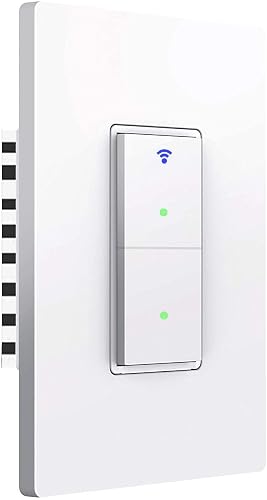
Prime Youngzuth WiFi Smart Double Light Switch

LANBON L10 Smart Light Switch with Large LCD

Prime SwitchBot Smart Switch Button Pusher Bluetooth
As an Amazon Associate we earn from qualifying purchases. Product prices and availability are accurate as of the date/time indicated.
Pros
- Intuitive single button operation with tap, multi press scene cycling, and hold to dim
- Reliable Zigbee connectivity via Hue Bridge that reduces WiFi congestion
- Compact, minimalist white design that blends easily into any room
- Highly customizable in the Hue app for rooms, zones, scenes, and automations
- Truly portable with versatile adhesive and magnetic mounting options
Cons
- Requires Philips Hue Bridge to unlock full features, adding cost for new users
- Button can fit loosely on its magnetic base and may fall off if bumped
- Single button offers less direct scene control than multi button Hue switches
The Philips Hue Smart Button (Model 605774) is a portable, battery powered wireless switch made for Hue Bridge users who want instant physical control without an app or voice command. It is ideal for nightstands, bathrooms, hallways, and entryways where fast, tactile lighting control is most useful.
In everyday use it is quick and dependable, with a single press to power lights on or off, repeated presses to cycle through up to 10 time based scenes, and press and hold to dim or brighten smoothly. The default time based light adjusts color and brightness to suit the time of day, while the Hue app lets you assign rooms, zones, and automations to start or stop with one touch.
Design is clean and minimalist, measuring just under 3 inches square in matte white plastic with a soft, responsive button. Installation is completely wire free using the included adhesive mount, which also doubles as a magnetic holder so you can place the button on walls or any magnetic surface and move it as needed.
The main drawback is the requirement for a Hue Bridge to access the full feature set, which is an extra investment if you are new to the Hue ecosystem. Some users report the button sits loosely on its magnetic base and can detach when bumped, and the single button layout provides less immediate scene access than Hue dimmer switches with multiple buttons.
Overall the Hue Smart Button is a simple, polished solution for effortless smart lighting control. If you already use Hue and want a flexible, reliable way to manage scenes, dimming, and automations from anywhere at home, it is a convenient and worthwhile upgrade.
Pros
- Very easy to install and pair with Alexa, no hub needed
- Reliable performance and quick reconnection after power or internet loss
- Voice and app control plus scheduling and routines
- Can still be used manually as a standard wall switch
- Clean white design fits most wall plates and decor
Cons
- Works only with Alexa, no support for Google Assistant, Apple HomeKit, or other hubs
- Requires a neutral wire and only supports 2.4 GHz Wi-Fi networks
- Single pole only, not compatible with 3-way setups and no dimming function
The Amazon Basics Single Pole Smart Switch is a straightforward way to make any standard single-pole light circuit smart, built exclusively for Alexa users. It is best for homeowners who already use Alexa and want an affordable, no-fuss upgrade without adding hubs or juggling multiple apps.
In real-world use, setup is impressively simple. After wiring, the switch appears directly in the Alexa app for voice control, remote access, and routine creation. Users report it responds reliably to voice commands and can be scheduled to turn on at sunset or off at specific times, with solid performance even at a distance from the router.
Design wise, the switch has a clean, minimal white finish with a familiar toggle feel and an LED status indicator for installation and reset. It comes with a wall plate, mounting hardware, and wire nuts, and fits standard single-gang boxes. Build quality is solid for the price, with ETL certification and indoor-rated components.
There are clear limitations to consider. It requires a neutral wire, which some older homes may lack, and it only connects on 2.4 GHz Wi-Fi. Since it is Alexa exclusive, it will not integrate with Google Assistant, HomeKit, or broader smart home hubs, and it does not support 3-way circuits or dimming.
Overall, this is an excellent value pick for Alexa-centric homes that need reliable single-pole control. If you want simple voice automation, scheduling, and remote control without complexity, it delivers exactly what it promises at an accessible entry point.
Pros
- Unique duplex design solves single-gang, two-load installations that most smart switches cannot handle
- Remote app access plus Alexa and Google Home integration works well for everyday control
- Flexible scheduling and timer automation helps reduce energy use
- CE, FCC and ETL certified with durable construction rated for over 100,000 cycles
- Direct WiFi connection with no hub required keeps setup simple and cost effective
Cons
- Requires a neutral wire and only supports 2.4GHz WiFi, no 5GHz compatibility
- On and off operation only, no dimming or fan speed regulation
- Some users report occasional WiFi disconnections and a snug fit in crowded multi-gang boxes
The Youngzuth WiFi Smart Double Light Switch is a 2-gang smart wall switch designed to replace a traditional duplex single-pole switch in a single-gang box. It connects directly to your 2.4GHz WiFi without a hub and is aimed at homeowners and renters who want smart control where space is limited or two loads share one box.
In daily use, it delivers reliable app and voice control through the Smart Life app, Amazon Alexa, and Google Home. You can toggle each gang separately, set 7-day schedules, and use countdown timers to automate lights or fans. Multi-control association also allows you to link switches for convenient 3-way style control without rewiring.
Build quality is solid for the price, with a flame-retardant PC housing, copper contacts, and a clean white push-button design. The switch measures 5.04 x 3.31 x 1.28 inches and is relatively shallow for a smart switch, though the double-gang layout can still be tight in crowded boxes. LED indicators add night visibility and can be turned off.
There are a few limitations to consider. It needs a neutral wire, it does not support dimming or speed regulation, and it only works on 2.4GHz WiFi. A small number of owners note intermittent WiFi drops that require reconnection, so placement near your router helps.
Overall, this switch stands out for solving a specific problem that few competitors address, offering affordable, hub-free smart control for two lights from one gang. If you need a duplex smart solution with scheduling and voice control and you have a neutral wire, it is a practical and compelling choice.
Pros
- Bright, large LCD with customizable display and icons for each switch location
- One model covers multiple layouts including gang and curtain control for whole home consistency
- Reliable 2.4GHz WiFi control via app and voice assistants without extra hub
- Motion wake feature improves visibility and convenience without fumbling for switches
Cons
- Requires neutral wire and 2.4GHz WiFi only, may not suit older wiring or 5GHz networks
- No dimmer function and not designed as a central control panel for other smart devices
- Motion detection is short range about 1 meter and only wakes screen, not full room sensing
The LANBON L10 is a smart LCD light switch designed to replace standard wall switches with a more visual and intuitive control center. It is ideal for homeowners building a modern smart home who want personalized control and clear labeling for every family member.
The large color touchscreen stands out with customizable headers that can show time, date, weather or calendar, with each switch displaying different information. Paired with Alexa, Google Assistant and the LANBON Smart Living app, it offers smooth voice and remote control, and users note reliable app pairing and responsive touch operation.
With a clean 4.73 inch tall profile and minimalist plastic housing, the L10 adds a premium, elegant look to any room. The bright display remains easy to read in everyday lighting, while the gentle motion activated glow adds convenience when approaching in the dark.
The switch requires a neutral wire and only supports 2.4GHz WiFi, so installation may not suit every home without checking wiring first. It also does not offer dimming, and the motion detection is limited to about one meter for waking the screen rather than full room sensing.
For users who value clarity, customization and flexible gang options in one device, the L10 delivers strong everyday usability and smart home integration. It is a compelling choice for families and smart home enthusiasts who want a stylish, informative upgrade over traditional switches.
Operation Mode: ON-OFF, Current Rating: 10A, Operating Voltage: 110V, Wattage: 1800W, Contact Type: Normally Closed
Connectivity: 2.4GHz WiFi and Bluetooth, Control Methods: App, Voice, Touch, Sensor, Compatible with Alexa, Google Assistant and LANBON Smart Living app
Dimensions: 2.91 x 1.3 x 4.73 inches, Mounting: Single gang wall box, Neutral wire required, Material: Plastic with copper contacts, IP00, FCC certified
Pros
- No wiring required, perfect for renters and quick upgrades
- Reliable app control with autonomous scheduling that works without phone nearby
- Optional Hub enables voice control, remote access and IFTTT integration
- Compact, minimalist design with simple adhesive installation
- 1-year warranty with free replacement for quality issues
Cons
- Not compatible with toggle switches, mini switches, touch panels or stiff, aged buttons
- Voice control and remote access require separate SwitchBot Hub and 2.4 GHz WiFi
- Adhesive needs 24 hours to fully bond and works best only on clean, smooth surfaces
The SwitchBot Smart Switch Button Pusher is a compact Bluetooth actuator that makes standard switches smart without any rewiring. It is designed for renters, busy households and anyone who wants to automate bedroom lights, fans or coffee makers without replacing existing hardware.
Its standout convenience is app based Bluetooth control plus built in timers that continue to run even when your phone is not nearby. Once schedules are set, the device reliably presses at the right time, and adding an optional SwitchBot Hub unlocks remote access, voice control with Alexa, Google Assistant and Siri, plus IFTTT automation.
At just 1.67 x 1.44 x 0.94 inches, the white plastic housing is discreet and blends easily next to any wall switch. Installation is truly tool free with included adhesive, and when mounted on a clean, dry, smooth surface with 24 hours of curing time, it holds firmly for daily use.
Compatibility is limited to rocker switches and one way buttons, so it will not work with toggle switches, touch panels or stiff, aged buttons. Bluetooth range is also limited without the Hub, and full voice and away from home control requires an additional purchase and a 2.4 GHz WiFi connection.
Overall, this Fingerbot delivers an affordable and clever way to add automation without electrical work. If you need simple, schedule driven control for a few key switches and value easy installation, it is a practical and reliable choice.
Brand: SwitchBot
Model: Smart Switch Button Pusher Bluetooth Fingerbot, White
Operation Mode: ON-OFF with Press Mode and Switch Mode (Switch Mode requires add-on)
Connectivity: Bluetooth for local control, optional SwitchBot Hub for WiFi, remote and voice control
Compatibility: Rocker switches and one-way buttons, not for toggle, mini switches or touch panels
Voice Support: Alexa, Google Assistant, Siri via Hub, plus IFTTT
Power: 3 volts, 50 milliamps
Material: Plastic
Dimensions: 1.67 x 1.44 x 0.94 inches
Installation: Adhesive mount, requires clean, dry, smooth surface and 24 hours for full bonding
Head-to-Head: Portable Large Button vs Large LCD Wall Switch
Installation and Wiring Requirements
The PHILIPS Hue Wireless Smart Light Switch Button is described as battery powered with easy, no-wire installation, using included adhesive or placement on any magnetic surface, and it requires a Hue Bridge to operate. The LANBON L10 Large LCD Smart Light Switch is a hardwired wall switch that requires a neutral wire and a standard single-gang wall box, and it supports 2.4GHz WiFi only with no hub required.
For renters, caregivers who want no electrical work, or homes where you need a button on a nightstand or hallway without opening a wall, the Philips Hue option may help reduce installation complexity. For households ready to replace an existing wall switch and that already have a neutral wire available, the LANBON L10 offers a permanent, wall-mounted solution that stays in one place. If you are also evaluating entry access, you may want to review wheelchair ramps for seniors with hearing loss alongside lighting changes.
Button Interface and Daily Usability for Seniors
The PHILIPS Hue Wireless Smart Light Switch Button centers on a larger smart button that you press to turn lights on and off, cycle through scenes, and press and hold to dim or brighten, with customization in the Hue app for Rooms, Zones, and time-based light. The LANBON L10 Large LCD Smart Light Switch centers on a large, bright color touchscreen with custom display, icons, labels, and a header that can show time, date, weather, or clock styles, plus motion-activated wake when you approach within about one meter.
If your senior benefits from one big, tactile press without looking at a screen, the Philips Hue button offers a simpler physical interaction that may help reduce confusion at night. If your senior benefits from clear visual information at a glance and you want each switch to show different useful information, the LANBON L10 provides a more informative display, though it is not a dimmer switch. For bedroom contexts where lighting and orientation matter, see best motion sensor night light for osteoporosis.
Both products aim to make lighting easier to manage without getting up repeatedly, which may help reduce the risk of falls during nighttime trips to the switch. The Philips Hue approach keeps the control portable and low profile, while the LANBON approach keeps the control fixed, visible, and personalized on the wall. Your choice depends on whether portability or on-wall information matters more for daily independence.
Connectivity, Power and Control Options
The PHILIPS Hue Wireless Smart Light Switch Button is battery powered and portable, and according to its description it needs the Hue Bridge to enable smart home control, app customization, and automation start and stop. The LANBON L10 Large LCD Smart Light Switch connects over 2.4GHz WiFi, works with Alexa, Google Assistant, and the LANBON Smart Living app, and supports multiple configuration modes including 1, 2, 3, 4 gang or curtain control, with one mode selected during setup.
If your home already uses Hue lighting and you want time-based scenes and automations tied to one click, the Philips Hue button integrates directly into that ecosystem. If you prefer a WiFi switch that does not need a separate hub and you want voice control plus app scheduling from anywhere, the LANBON L10 aligns with that setup, though you will need stable 2.4GHz coverage at the switch location. Families planning broader fall prevention upgrades can also explore Fall Prevention resources to coordinate lighting with other supports.
Footprint, Placement and Home Integration
The PHILIPS Hue Wireless Smart Light Switch Button has a small, sleek footprint designed to be stuck to a wall, placed on a magnetic surface, or carried to a bedside table, which gives you flexibility to put light control exactly where a senior reaches most easily. The LANBON L10 Large LCD Smart Light Switch occupies a standard single-gang wall box but presents a large LCD face that becomes a visible focal point, and it is intended as a fixed control rather than a movable remote.
If you need to add control without changing wall wiring, or you want to create a second control point in a hallway or bedroom without running new wires, the Philips Hue button offers more placement freedom. If you want a clean, modern wall control that also shows time or weather and wakes as someone approaches, the LANBON L10 offers a more integrated look, but it stays where it is installed. For entrance areas where a switch alone will not solve access, review top portable wheelchair ramp for car for seniors with arthritis in car to understand how portable ramps fit a different safety need.
Which One Should You Get?
Choose the PHILIPS Hue Wireless Smart Light Switch Button if you want a large, simple press control that requires no wiring, can be placed on a nightstand, headboard, or wall with adhesive, and you already have or plan to use a Hue Bridge for scenes and time-based light. This option may help seniors who have difficulty reaching a wall switch at night, who prefer one tactile button, or who need a temporary or rental-friendly solution that you can relocate as needs change.
Choose the LANBON L10 Large LCD Smart Light Switch if you want a large, easy-to-read touchscreen that stays on the wall, shows personalized information like time or weather, and supports multiple gang or curtain modes over WiFi with Alexa or Google Assistant. This option may help households that want a permanent, highly visible control center at the wall, have a neutral wire and suitable wall box, and prefer app and voice control without adding a separate hub.
If neither large-control approach matches your wiring or ecosystem, the Amazon Basics Smart Light Switch, Single Pole is another single-pole WiFi option some families consider briefly, though it lacks the large button or large LCD focus compared here. For most aging-in-place lighting decisions, the choice comes down to portable simplicity versus fixed, information-rich display.
Who Should Skip Both?
Both of these smart light switches are not ideal for households where the primary barrier is getting safely in and out of the home. If a senior uses a walker or wheelchair, faces a high threshold, steps, or an uneven entry, lighting alone will not address the core mobility challenge, and an outdoor ramp or entry modification should be evaluated first with a physical therapist or healthcare provider.
These switches are also not a good fit if you do not have the required infrastructure. The Philips Hue option is not recommended for homes without a Hue Bridge or willingness to add one, and the LANBON L10 is not the right choice if you lack a neutral wire, lack 2.4GHz WiFi at the switch location, or need a dimmer, since it is described as not a dimmer switch. In those cases, explore other Outdoor & Entrance Safety solutions and consult an electrician about compatible alternatives.
Frequently Asked Questions
Do these two switches solve the same problem as an outdoor wheelchair ramp?
No, they address indoor lighting control, not entry access. A smart light switch large button may help reduce the risk of stumbles by making lights easier to operate at night, while an outdoor wheelchair ramp addresses thresholds and steps for wheeled mobility. Many families need both, but the priority depends on whether indoor navigation or getting in and out is the bigger barrier.
Which is easier to install for a caregiver with no electrical experience?
The PHILIPS Hue Wireless Smart Light Switch Button is described as battery powered with no-wire installation via adhesive or magnetic placement, plus a Hue Bridge requirement. The LANBON L10 Large LCD Smart Light Switch requires a neutral wire, a standard single-gang box, and 2.4GHz WiFi setup, so it typically needs more planning and may need an electrician if wiring is uncertain.
Which offers better everyday usability for seniors with low vision or limited dexterity?
The Philips Hue button offers a larger physical press and hold to dim, which can be simpler for limited dexterity and does not require reading a screen. The LANBON L10 offers a large color LCD with customizable icons and motion wake, which can help with visibility and orientation, but it requires interacting with a touchscreen on the wall. Consider which interaction, tactile press versus visual touchscreen, matches the senior’s preferences and abilities.
Browse more picks in our Outdoor & Entrance Safety category, or see our related guide on Door Lever Handles for Seniors Outdoors in 2026.









Write Your Review
No reviews yet. Be the first to share your experience!