

When you need to steady yourself with one hand, hunting for a small flat toggle with the other is the last thing you want. For seniors living with balance concerns, that moment of leaning, squinting, and pressing a precise spot can feel unsteady, especially at night or when entering a dark room.
In this guide we focused on smart switches that offer a larger, more forgiving press area and simple control options that reduce extra steps. You will find portable buttons you can place at the perfect height, hardwired smart switches with clear visual feedback, and models that add voice control for hands free use. We compared ease of pressing, mounting flexibility, and everyday visibility to help you choose with confidence. For more context on accessible lighting, see our overview of large button options for elderly users with balance issues. This guide contains affiliate links, and we may earn a commission if you buy through them, at no extra cost to you.
Quick Picks at a Glance
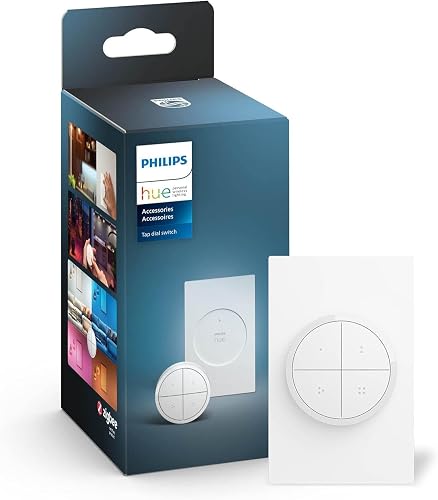
Prime Philips Hue Tap Dial Switch White

Prime Philips Hue Smart Button Wireless Switch

Prime Amazon Basics Single Pole Smart Light Switch

Prime Tapo S200D Smart Button Wireless Dimmer Switch
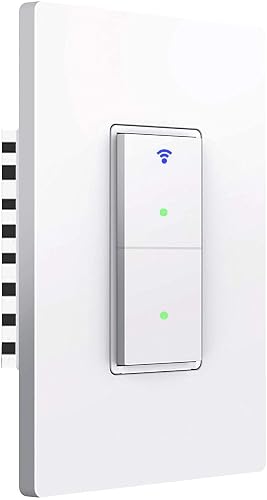
Prime Youngzuth WiFi Smart Double Light Switch

LANBON L10 Smart Light Switch with Large LCD

Prime Amazon Basics Smart Remote for Alexa

Prime Leviton Decora Smart Switch D315S

Prime LANBON L8-HS WiFi Mesh Smart Light Switch with LCD
As an Amazon Associate we earn from qualifying purchases. Product prices and availability are accurate as of the date/time indicated.
Pros
- Versatile 3-in-1 design works as wall switch, remote, and magnetic mount
- Smooth and responsive dial with speed-sensitive dimming control
- Four buttons each customizable to different rooms, zones, or scenes
- Clean matte design in white that blends into any decor
- Reliable Zigbee and Matter connectivity without using WiFi bandwidth
Cons
- Requires a Hue Bridge for full features, automations, and remote access
- Powered by CR2032 battery that will need periodic replacement
- Only compatible with Philips Hue and Matter devices, not a replacement for standard wired switches
The Philips Hue Tap Dial Switch is a wireless, battery powered controller built for Philips Hue users who want physical lighting control without rewiring. It is perfect for families and shared households where not everyone wants to rely on an app to change scenes or brightness.
In daily use, the four programmable buttons let you trigger different scenes, rooms, or zones with a single press, while the rotary dial makes dimming intuitive. Turn slowly for precise, gradual adjustments or spin quickly to brighten or dim a room instantly, giving you fast and natural control.
The design is minimal and modern with a matte white finish and compact plastic housing that looks great on any wall. It mounts with adhesive backing, detaches to work as a handheld remote, and can stick to metal surfaces, so you can place it anywhere without tools or wiring.
The main limitation is the Hue Bridge requirement for automations, out of home control, and stable Zigbee performance, which adds cost if you do not already own one. As a battery device it needs occasional CR2032 replacements, and it cannot directly control non-smart or non-Matter bulbs.
Overall, the Tap Dial Switch is one of the most flexible Hue accessories for adding tactile, customizable control. If you already use Hue and want convenient, app-free lighting control for the whole home, it is a highly recommended upgrade.
Connectivity: Zigbee, Matter compatible, requires Hue Bridge for automations and remote access. Control type: Push button with rotary dial, 4 programmable positions.
Power and Mounting: 3V CR2032 battery included, wall mount with adhesive, portable remote use, magnetic attachment to metal surfaces. IP20, for indoor use.
Compatibility: Philips Hue devices and Matter compliant smart home devices. Supports control of different Rooms or Zones per button.
Dimensions and Build: 5.87 x 3.43 x 2.87 inches, 9.07g, plastic body with metal contacts. Color White, also available in Black. Model 046677582036, Part Number 578807.
Certifications and Warranty: CE, ETL, REACH, RoHS, WEEE certified. 2 year manufacturer warranty from Signify North America Corporation.
Pros
- Intuitive single button operation with tap, multi press scene cycling, and hold to dim
- Reliable Zigbee connectivity via Hue Bridge that reduces WiFi congestion
- Compact, minimalist white design that blends easily into any room
- Highly customizable in the Hue app for rooms, zones, scenes, and automations
- Truly portable with versatile adhesive and magnetic mounting options
Cons
- Requires Philips Hue Bridge to unlock full features, adding cost for new users
- Button can fit loosely on its magnetic base and may fall off if bumped
- Single button offers less direct scene control than multi button Hue switches
The Philips Hue Smart Button (Model 605774) is a portable, battery powered wireless switch made for Hue Bridge users who want instant physical control without an app or voice command. It is ideal for nightstands, bathrooms, hallways, and entryways where fast, tactile lighting control is most useful.
In everyday use it is quick and dependable, with a single press to power lights on or off, repeated presses to cycle through up to 10 time based scenes, and press and hold to dim or brighten smoothly. The default time based light adjusts color and brightness to suit the time of day, while the Hue app lets you assign rooms, zones, and automations to start or stop with one touch.
Design is clean and minimalist, measuring just under 3 inches square in matte white plastic with a soft, responsive button. Installation is completely wire free using the included adhesive mount, which also doubles as a magnetic holder so you can place the button on walls or any magnetic surface and move it as needed.
The main drawback is the requirement for a Hue Bridge to access the full feature set, which is an extra investment if you are new to the Hue ecosystem. Some users report the button sits loosely on its magnetic base and can detach when bumped, and the single button layout provides less immediate scene access than Hue dimmer switches with multiple buttons.
Overall the Hue Smart Button is a simple, polished solution for effortless smart lighting control. If you already use Hue and want a flexible, reliable way to manage scenes, dimming, and automations from anywhere at home, it is a convenient and worthwhile upgrade.
Pros
- Very easy to install and pair with Alexa, no hub needed
- Reliable performance and quick reconnection after power or internet loss
- Voice and app control plus scheduling and routines
- Can still be used manually as a standard wall switch
- Clean white design fits most wall plates and decor
Cons
- Works only with Alexa, no support for Google Assistant, Apple HomeKit, or other hubs
- Requires a neutral wire and only supports 2.4 GHz Wi-Fi networks
- Single pole only, not compatible with 3-way setups and no dimming function
The Amazon Basics Single Pole Smart Switch is a straightforward way to make any standard single-pole light circuit smart, built exclusively for Alexa users. It is best for homeowners who already use Alexa and want an affordable, no-fuss upgrade without adding hubs or juggling multiple apps.
In real-world use, setup is impressively simple. After wiring, the switch appears directly in the Alexa app for voice control, remote access, and routine creation. Users report it responds reliably to voice commands and can be scheduled to turn on at sunset or off at specific times, with solid performance even at a distance from the router.
Design wise, the switch has a clean, minimal white finish with a familiar toggle feel and an LED status indicator for installation and reset. It comes with a wall plate, mounting hardware, and wire nuts, and fits standard single-gang boxes. Build quality is solid for the price, with ETL certification and indoor-rated components.
There are clear limitations to consider. It requires a neutral wire, which some older homes may lack, and it only connects on 2.4 GHz Wi-Fi. Since it is Alexa exclusive, it will not integrate with Google Assistant, HomeKit, or broader smart home hubs, and it does not support 3-way circuits or dimming.
Overall, this is an excellent value pick for Alexa-centric homes that need reliable single-pole control. If you want simple voice automation, scheduling, and remote control without complexity, it delivers exactly what it promises at an accessible entry point.
Pros
- Wire free installation with screw, adhesive, and magnetic mounting options
- Highly customizable controls for on/off, dimming, color temperature and multi-device scenes
- Long battery life and wide coverage via low power Sub-1G hub connection
- Enables 3-way and 4-way lighting without electrical work, perfect for rentals and hallways
- Local smart actions work even when internet is down and includes doorbell function
Cons
- Tapo Hub H100 required and sold separately, cannot work standalone
- Natively limited to Tapo ecosystem, broader control needs Alexa integration
- Some users report occasional response delays of several seconds
The Tapo S200D is a wireless smart button and remote dimmer that works with the Tapo Hub H100 to give you instant physical control of Tapo lights and plugs. It is built for renters, families, and anyone who wants convenient lighting without rewiring or constantly using a phone app.
In daily use it stands out for its customizable tap and rotate controls, letting you assign single tap, double tap, and rotation to on/off, dimming, color temperature, or full room scenes. Users love turning a single pole light into a 3-way or 4-way setup and appreciate extra features like a doorbell with 19 tones and emergency alert via the hub.
Design is clean and minimal in white, with a lightweight 0.13 kg body and a magnetic button that lifts off its wall plate for handheld use. You can install it with screws, adhesive, or on any magnetic surface, and the included CR2032 battery lasts over a year thanks to efficient Sub-1G wireless.
Drawbacks center on ecosystem dependence, as it will not function without the Hub H100 and a secured 2.4 GHz WiFi network. A small number of users note occasional delays of up to several seconds, and native control is limited to Tapo devices unless bridged through Alexa.
Overall the S200D is a versatile and reliable add on for existing Tapo homes that want flexible, app free lighting control. If you already own the Tapo Hub and value wire free dimming, multi location control, and simple installation, it is an excellent and practical choice.
Pros
- Unique duplex design solves single-gang, two-load installations that most smart switches cannot handle
- Remote app access plus Alexa and Google Home integration works well for everyday control
- Flexible scheduling and timer automation helps reduce energy use
- CE, FCC and ETL certified with durable construction rated for over 100,000 cycles
- Direct WiFi connection with no hub required keeps setup simple and cost effective
Cons
- Requires a neutral wire and only supports 2.4GHz WiFi, no 5GHz compatibility
- On and off operation only, no dimming or fan speed regulation
- Some users report occasional WiFi disconnections and a snug fit in crowded multi-gang boxes
The Youngzuth WiFi Smart Double Light Switch is a 2-gang smart wall switch designed to replace a traditional duplex single-pole switch in a single-gang box. It connects directly to your 2.4GHz WiFi without a hub and is aimed at homeowners and renters who want smart control where space is limited or two loads share one box.
In daily use, it delivers reliable app and voice control through the Smart Life app, Amazon Alexa, and Google Home. You can toggle each gang separately, set 7-day schedules, and use countdown timers to automate lights or fans. Multi-control association also allows you to link switches for convenient 3-way style control without rewiring.
Build quality is solid for the price, with a flame-retardant PC housing, copper contacts, and a clean white push-button design. The switch measures 5.04 x 3.31 x 1.28 inches and is relatively shallow for a smart switch, though the double-gang layout can still be tight in crowded boxes. LED indicators add night visibility and can be turned off.
There are a few limitations to consider. It needs a neutral wire, it does not support dimming or speed regulation, and it only works on 2.4GHz WiFi. A small number of owners note intermittent WiFi drops that require reconnection, so placement near your router helps.
Overall, this switch stands out for solving a specific problem that few competitors address, offering affordable, hub-free smart control for two lights from one gang. If you need a duplex smart solution with scheduling and voice control and you have a neutral wire, it is a practical and compelling choice.
Pros
- Bright, large LCD with customizable display and icons for each switch location
- One model covers multiple layouts including gang and curtain control for whole home consistency
- Reliable 2.4GHz WiFi control via app and voice assistants without extra hub
- Motion wake feature improves visibility and convenience without fumbling for switches
Cons
- Requires neutral wire and 2.4GHz WiFi only, may not suit older wiring or 5GHz networks
- No dimmer function and not designed as a central control panel for other smart devices
- Motion detection is short range about 1 meter and only wakes screen, not full room sensing
The LANBON L10 is a smart LCD light switch designed to replace standard wall switches with a more visual and intuitive control center. It is ideal for homeowners building a modern smart home who want personalized control and clear labeling for every family member.
The large color touchscreen stands out with customizable headers that can show time, date, weather or calendar, with each switch displaying different information. Paired with Alexa, Google Assistant and the LANBON Smart Living app, it offers smooth voice and remote control, and users note reliable app pairing and responsive touch operation.
With a clean 4.73 inch tall profile and minimalist plastic housing, the L10 adds a premium, elegant look to any room. The bright display remains easy to read in everyday lighting, while the gentle motion activated glow adds convenience when approaching in the dark.
The switch requires a neutral wire and only supports 2.4GHz WiFi, so installation may not suit every home without checking wiring first. It also does not offer dimming, and the motion detection is limited to about one meter for waking the screen rather than full room sensing.
For users who value clarity, customization and flexible gang options in one device, the L10 delivers strong everyday usability and smart home integration. It is a compelling choice for families and smart home enthusiasts who want a stylish, informative upgrade over traditional switches.
Operation Mode: ON-OFF, Current Rating: 10A, Operating Voltage: 110V, Wattage: 1800W, Contact Type: Normally Closed
Connectivity: 2.4GHz WiFi and Bluetooth, Control Methods: App, Voice, Touch, Sensor, Compatible with Alexa, Google Assistant and LANBON Smart Living app
Dimensions: 2.91 x 1.3 x 4.73 inches, Mounting: Single gang wall box, Neutral wire required, Material: Plastic with copper contacts, IP00, FCC certified
Pros
- No wiring or tools required for setup
- Portable and versatile mounting options including magnetic, wall and surface
- Supports powerful Alexa routine automations for multiple devices at once
- Simple setup through the Alexa app with clear LED feedback
- Compact and lightweight at just over one ounce
Cons
- Works only with Alexa and requires a compatible Echo device as a hub
- Not compatible with many older Echo models including Echo Dot V1 and Echo Show V1/V2
- Bluetooth range limited to about 32 feet from the Echo
The Amazon Basics Smart Remote HCR-Z54C-B-A667-01 is a compact Bluetooth push button designed exclusively for Alexa ecosystems. It is made for households that already use Echo devices and want tactile, voice free control of everyday routines and smart devices.
Instead of speaking commands, you can press the button to run customized Alexa routines that control lights, music, blinds, locks, fans and more at once. Setup is handled in the Alexa app with your Echo acting as the hub, and LED indicators help confirm connection status and routine activation within a 32 foot range.
At just 3.35 inches long and 1.04 ounces, the remote is truly handheld and portable with options for wall, magnetic or surface mounting. The white plastic housing feels simple and functional, with a single push button, copper contacts and a 3 volt battery included for immediate use.
The Alexa only limitation is the biggest consideration, as it will not work without a compatible Echo and excludes many older models like Echo Dot V1 and Echo Show V1. Bluetooth connectivity also means you need to stay relatively close to your Echo, and all automations must be preconfigured as routines in the Alexa app.
For Alexa users seeking an affordable, no wiring solution to simplify smart home control, this remote offers excellent convenience and flexibility. It is especially useful as a bedside or entryway control for anyone who prefers a physical button over voice commands.
Model: HCR-Z54C-B-A667-01 | Brand: Amazon Basics | Connectivity: Bluetooth | Control Method: Push Button and Voice via Alexa
Power: 3 volts battery powered | Switch Type: Wireless Push Button, Normally Open, ON-ON | Mounting: Wall, Magnetic or Surface
Dimensions: 3.35 x 1.42 x 0.46 inches | Weight: 1.04 ounces | Material: Plastic with copper contacts | Color: White
Compatibility: Requires compatible Echo device as hub, check Works with Alexa widget before purchase | Included: Battery, battery tool, user manual
Pros
- Matter certified for broad platform support without a hub
- Supports both wired and wire-free 3-way for easy installation
- Slim design with screwless wallplate included and interchangeable faceplate options
- Reliable app control with scheduling and remote access
- Rated for diverse loads including lights, fans and small motors
Cons
- Neutral wire required, not compatible with older wiring without a neutral
- Connects only to 2.4 GHz Wi-Fi, 5 GHz networks not supported
- On and off control only, no built-in dimming function
The Leviton D315S Decora Smart Switch is a Wi-Fi connected on and off switch that turns any standard bulb smart and connects directly to your 2.4 GHz network. It is built for homeowners who want simple, hub-free integration across major platforms using Matter, including Alexa, Google Assistant and Apple Home.
Standout features include Matter readiness out of the box, voice control, and full app control through My Leviton for schedules, timers and sunset to sunrise automation. In daily use it offers reliable remote access and the flexibility to add wire-free control with the DAWSC Anywhere Switch or traditional wired 3-way with the DD0SR companion.
Design and build reflect Leviton's Decora heritage with a slim profile for easier installation, an LED locator light for visibility at night, and a clean screwless wallplate included. The switch feels solid, supports loads up to 15A and 1/3 HP for lights, fans and pumps, and color can be changed with optional DDKIT-S kits to match your decor.
Drawbacks are typical for this class but worth noting. It requires a neutral wire, so it may not suit older homes without one, and Wi-Fi support is limited to 2.4 GHz. It is also strictly an on and off switch, so if you need dimming you will need a separate Decora Smart dimmer model.
Overall the D315S is a strong choice for anyone expanding a connected home with flexible, future-proof control. If you want Matter compatibility, broad voice support and easy 3-way options without a hub, this switch delivers excellent value and ease of use.
Model: Leviton D315S-1RW Decora Smart Switch, White. Connectivity: 2.4 GHz Wi-Fi, Matter certified, no hub required. Compatibility: Alexa, Google Assistant, Apple Home and Siri, SmartThings, Home Assistant via Matter.
Electrical Rating: Up to 15A and 1/3 HP for LED, CFL, incandescent, fluorescent and motor loads. Wiring: Neutral wire required, supports single pole and wired or wire-free 3-way and multi-location with DD0SR or DAWSC companions.
Dimensions: 1.09 x 1.8 x 4.12 inches, 7.4 ounces. Features: LED locator light, slim depth for easier install, screwless wallplate included, optional DDKIT-S color change kits. Warranty: 1-year limited warranty.
Pros
- WiFi Mesh improves stability and speed, especially when multiple switches are installed
- LCD personalization with names and icons makes identifying each light fast and intuitive
- Simple wireless 3-way setup lets you control one light from two switches without rewiring
- Compatible with Alexa and Google Assistant for convenient voice control
- App scheduling and remote access allow automation and control from anywhere
Cons
- Requires neutral wire and fits only regular single-gang boxes, not 2/3/4 gang boxes
- No dimming function and supports only 2.4GHz WiFi during setup
- Works only with the Smart Living app, not compatible with Tuya, Smart Life or HomeKit
The LANBON L8-HS is a WiFi Mesh LCD smart light switch designed for whole-house use. It offers 1, 2 or 3 gang operation and wireless 3-way control in a single-gang form factor. It is best for homeowners planning a modern smart home who have neutral wiring and want centralized, customizable lighting control.
Its standout feature is WiFi Mesh networking, which converts the router signal into a Mesh network that auto-connects each switch to the nearest point. This enhances coverage and keeps devices online even in distant corners, and performance improves as you add more switches. The LCD panel, app timers, remote access and Alexa and Google voice support provide flexible daily control.
Design is sleek and modern with a durable polycarbonate build and a 2.8-inch LCD touch display. You can personalize button names, icons, button colors and edge lighting, plus set the night light to stay on, off or on a schedule. The illuminated buttons remain visible in the dark and adapt easily to different interior styles.
There are some limitations to consider. Installation requires a neutral wire and a standard single-gang box, so it is not ideal for older homes without neutral wiring. It also lacks dimming, connects only on 2.4GHz WiFi, and requires the Smart Living app with no support for Tuya or HomeKit.
Overall, the L8-HS delivers strong value for users wanting a stable, customizable and voice ready light switch system. If your home meets the wiring requirements and you prefer a unified Mesh ecosystem, it is a smart and stylish choice for whole-house lighting automation.
Model: L8-HS-SL-W-US (Part Number L8-HSU-SL)
Connectivity: WiFi Mesh, 2.4GHz only, Smart Living app for iOS and Android
Control Methods: LCD Touch, App, Voice via Amazon Alexa and Google Assistant
Configuration: 1/2/3 Gang selectable, Wireless 3-Way, Single Pole, No Dimming
Electrical: 120V, 10A, ON-OFF-ON operation, Normally Closed contact, Screw terminal
Mounting: Wall Mount, Single-Gang box only, Neutral wire required, IP31, FCC certified
Material and Size: Polycarbonate, Brass contacts, White, 4.72 x 2.91 x 1.26 inches
Buying Guide: How to Choose a Large Button Smart Switch for Balance and Ease of Use
Choosing a switch for someone with balance issues is about more than brightness. You want a control that is easy to find, easy to press without fine finger control, and easy to operate without crossing a dark room. These four criteria will help you narrow the list quickly.
We evaluated each model for real world senior friendly use, from button size to app simplicity. You can explore more monitoring and safety ideas in our Smart Alerts & Monitoring section if you are building a broader support system at home.
1. Button Size, Press Force, and Tactile Feedback
A large button helps when your balance feels uncertain and you cannot use a precise fingertip press. Look for a wide, slightly raised surface that you can trigger with a palm, knuckle, or the side of your hand. The PHILIPS Hue Wireless Smart Light Switch Button is a strong example, offering a generous button area with a simple click and a press and hold gesture for dimming that does not demand pinpoint accuracy.
Consider how the switch confirms your press. A clear tactile click or a subtle visual cue prevents you from leaning in for a second try. The Philips Hue Wall Tap Dial Light Switch adds a dial plus four distinct buttons, so you can assign different rooms or scenes and feel each press confidently. If you have limited hand strength or arthritis, avoid flat capacitive panels that need a light swipe and favor a mechanical style press that registers with minimal effort.
2. Flexible Placement Without Rewiring or Bending
Balance issues make it risky to stretch, bend low, or reach behind furniture to find a switch. Wireless, battery powered controls solve this by letting you place the button exactly where your hand naturally falls. The Tapo Smart Button, Wireless Remote Dimmer Switch mounts with adhesive or holds to a magnetic surface, so you can set it at waist or shoulder height near a bed, hallway entrance, or favorite chair.
Hardwired options require more planning but offer a clean, always powered solution. Models like the LANBON L10 Large LCD Smart Light Switch and the LANBON Smart Light Switch,1/2/3 Gang,3 Way need a neutral wire and a standard single gang box, and they support multiple gang configurations. Before you choose a hardwired switch, check your wiring and consider who will install it. To plan a whole home layout that minimizes extra walking, you can browse ideas on our Smart Home for Seniors hub. Also think about height, a switch placed a few inches higher can keep you upright instead of leaning forward.
3. Hands Free Control and Automation to Reduce Trips Across Dark Rooms
The safest trip is the one you do not have to take. Voice control lets you turn lights on from the doorway without crossing a dark space, which is invaluable when your balance is unsteady. The Leviton Decora Smart Switch, Wi-Fi works with Alexa, Google Assistant, and Apple Home and supports Matter for broad compatibility, while the Amazon Basics Smart Light Switch, Single Pole and the Smart Light Switch, WiFi Smart Double Switch both respond to Alexa and Google Home for simple voice commands and app scheduling.
Automation adds another layer of steadiness. Timers, sunrise and sunset schedules, and routines can keep hallways lit before you get up at night. Portable options like the Amazon Basics Smart Dimmer Switch and Remote pair through an Echo device and let you control lights from anywhere in the house without speaking. If you are selecting equipment for an older adult in your care, it is wise to consult a doctor, occupational therapist, or physical therapist before making safety related changes, especially when rearranging switches or adding automation. For delivery and entry safety that pairs well with indoor lighting, see this invacare package delivery box review for elderly to reduce porch trips as well.
4. Visibility in Low Light and Clear Confirmation
When your eyes are adjusting to darkness, a switch that is easy to see helps you stay upright. Look for illuminated surfaces, high contrast labels, or a screen that wakes as you approach. The LANBON L10 Large LCD Smart Light Switch offers a large color LCD that shows time, weather, or custom icons and wakes with motion from about one meter, so you can locate it without fumbling along the wall.
Clear feedback after a press matters just as much. An LCD label that reads Bedroom On, an edge glow, or a distinct click tells you the command worked so you do not need to step closer to check. Traditional single pole smart switches like the Leviton Decora model use familiar paddle actions with added app status, while the Hue Tap Dial gives scene based control where each button can trigger a preset. For overnight safety, prioritize a switch you can identify by sight and touch, and consider pairing it with related large button switch ideas for elderly users to keep the control style consistent across rooms.
Who Shouldn’t Buy This
This type of large button smart switch is not a good fit for homes where you cannot add a neutral wire, need built in dimming from the hardwired switch itself, or want a hub free setup but prefer a battery free install everywhere. If you rent and cannot change wall switches, or you need a fully portable solution you can move between rooms without any wiring, a small adhesive battery button with a hub may suit you better than a wired LCD panel. This category also is not ideal for anyone who expects a central control panel to manage an entire home from one screen, since models like the LANBON L10 are switches, not whole home dashboards.
Final Thoughts
If you want the simplest large press with flexible placement, the PHILIPS Hue Wireless Smart Light Switch Button makes a great starting point for bedside or hallway use, while the LANBON L10 Large LCD Smart Light Switch is ideal when you prefer a hardwired, highly visible control with custom icons and motion wake for a main living area.
Frequently Asked Questions
What makes a large button smart switch safer for seniors with balance issues?
A larger surface lets you press with a palm or knuckle instead of a precise fingertip, so you can stay more upright and keep your other hand on a support. Many models also add voice control or portable placement, which helps you turn lights on before you walk into a dark room. In 2026, the most senior friendly designs combine a low effort press with clear tactile or visual confirmation.
Do I need a neutral wire or a hub for these switches?
It depends on the model. Hardwired switches like the LANBON L10 and Leviton Decora require a neutral wire and connect directly over 2.4 GHz Wi-Fi. Battery powered buttons like the Hue Wireless Button and Tapo Smart Button do not need house wiring but do require a Hue Bridge or Tapo Hub respectively. Check your wall box and your existing ecosystem before you buy to avoid extra accessories.
Can I use voice commands so I do not have to walk to the switch?
Yes. Most options in this roundup work with Alexa and Google Assistant, and some support Apple Home as well. You can say turn on hallway lights or set a routine that lights the path to the bathroom at night. For additional safety coverage beyond lighting, explore Smart Alerts & Monitoring tools that pair well with automated lights.
Where should I place the switch to help with balance at night?
Place one control at the entrance to each dark area and one within arm’s reach of the bed. Mount wireless buttons at a natural hand height so you do not need to bend or stretch, and consider a second button on the opposite side of a long hallway. Using schedules or motion wake features ensures the path is lit before you stand, which helps you stay steady from the first step.
Browse more picks in our Smart Alerts & Monitoring category, or see our related guide on Large Button Smart Switches for Seniors in 2026.









Write Your Review
No reviews yet. Be the first to share your experience!