

Quick Answer
If your large display clock feels unstable for an elderly user, check the surface, base, and cord first. Most wobble comes from a light plastic housing on a soft, uneven, or crowded nightstand, or from a cord that gets tugged when the user reaches for the clock.
Why This Happens
Large display clocks are built to be light and easy to move, which also makes them easy to tip. A small base with a tall screen can feel top heavy, especially if the nightstand is soft, warped, or covered with a cloth, and if the clock sits near the edge where a hand or sleeve can bump it. Always check with a healthcare provider, physician, or occupational therapist before making safety changes for a senior in your care, especially if unsteadiness or falls are a concern.
Cords are another common cause. Many 7 inch clocks must stay plugged in to work, and the power adapter cord can pull from behind or from the side. If the cord is tight, draped over the nightstand edge, or tangled with a lamp or phone charger, any movement can drag the clock.
Placement and viewing angle also matter. If the clock is too high, too low, or angled away, an older adult may lean, stretch, or twist to read it, which increases the chance of bumping it. Glare, dim brightness, or a hard to read display can lead to repeated reaching and adjusting that makes the clock seem unstable even when the base is fine.
Finally, the clock may not match the person’s needs. A model without clear feet, wall mount options, or simple controls may be moved often for reading or setting, and frequent handling loosens its position. For broader bedroom setup ideas, you can review guidance on Bedroom Fall Prevention to see how nightstand clutter, lighting, and reach distance work together.
Practical Steps to Try
Try these checks in order, starting with the easiest and safest options. Stop and reassess if anything feels unsteady or requires you to move heavy furniture.
- Check the surface first. Move the clock to a flat, hard, stable part of the nightstand away from the edge. Remove tablecloths, doilies, or padded mats under the clock, clear clutter around it, and make sure all four feet or the stand touch the surface without rocking.
- Steady the base. Look for small rubber feet, a fold out stand, or a wall mount slot on the back. Clean dust from the feet, unfold the stand fully until it clicks, and if wall mounting is an option, use the proper anchor for your wall type and keep the cord routed neatly so it does not pull.
- Secure the cord. Give the power cord a little slack near the clock so it is not taut, then route it behind the nightstand and toward the outlet without crossing a walkway. Use a cord clip on the back of the nightstand to keep it from snagging, and confirm you are using the original adapter that came with the clock for a snug fit.
- Adjust placement for easy viewing. Put the clock at eye level when the person is sitting up in bed, slightly angled toward them, and within easy reach without leaning. If the room is dim at night, consider soft, automatic lighting nearby so the person does not have to fumble for the clock, such as the options in best motion sensor night light for osteoporosis.
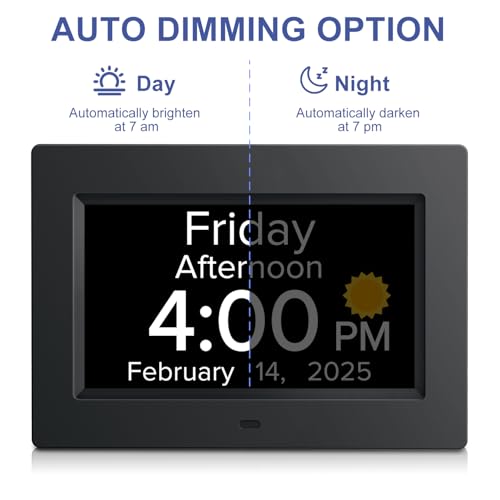
- Check settings and stability over a day. Set brightness to a comfortable daytime level and a lower nighttime level if auto dimming is available, confirm time format and date are correct, and then watch for a day to see if the clock still shifts when the person uses it. If it still moves, note when it happens, for example when reaching across the bed or when the cord is brushed.
When a Product Can Help
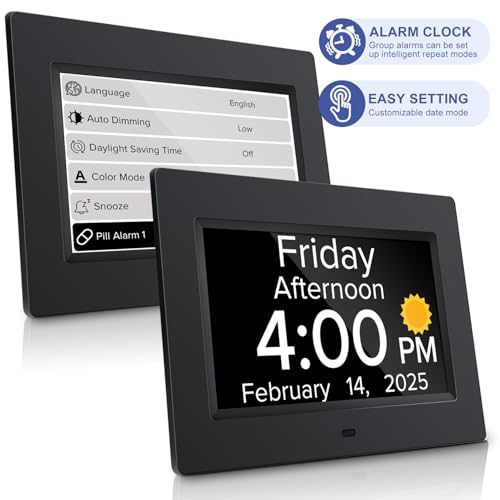
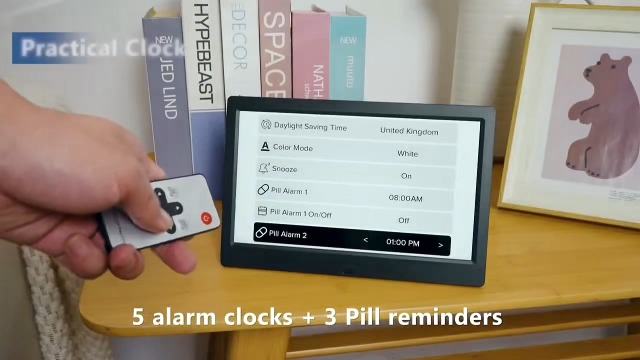
If the surface is flat and the cord is secure but the clock still feels tippy, a different design may be a more stable next step. One common option is a model with a wider base or dual desktop and wall mount options and simple controls that reduce the need to pick it up, so it can stay in one steady spot. For example, some caregivers look for a 7 inch display with bold letters, voice announcement, and auto dimming that stays readable without moving the unit.
This guide contains affiliate links, and we may earn a commission if you buy through them, at no extra cost to you.

Prime MITOART 7 Inch Digital Dementia Clock for Seniors





As an Amazon Associate we earn from qualifying purchases. Product prices and availability are accurate as of the date/time indicated.
When to Talk to a Professional Instead
A clock fix is not the right focus if the unsteadiness is about the person rather than the object. If your loved one frequently loses balance when reaching, leans heavily on furniture, or has had recent falls, dizziness, or vision changes, talk with a doctor, physician, physical therapist, or occupational therapist before rearranging the bedroom.
This type of clock is also not ideal for someone who needs hands on support to sit up, stand, or reposition in bed. A clock, even a stable one, is not a support surface and is not a good fit as a balance aid. In those cases a professional can suggest safer bedroom supports, and you can learn more about options like best bed rails for seniors with osteoporosis as part of a broader plan.
Skip this kind of tabletop clock and seek professional guidance first if the bedroom layout requires the senior to twist, overreach, or get up in the dark to see the time. A clinician can help assess lighting, bed height, and placement so time checks do not create extra reaching or nighttime walking.
Frequently Asked Questions
Why does my large display clock tip over so easily?
Most large display clocks are lightweight with a small footprint, so they can tip if the stand is not fully opened or the surface is soft or uneven. Try a hard, flat spot away from the edge and make sure the cord has slack so it does not pull the clock when brushed.
Should I wall mount the clock to make it more stable?
Wall mounting can help if the nightstand is crowded or unsteady, and many 7 inch clocks offer both desktop and wall options. Check that the wall and anchor are suitable, keep the cord routed safely, and place the clock where it can be read without leaning or standing.
What if the clock is stable but still hard for my loved one to use?
Hard to read displays, glare, or complex buttons often lead to extra handling that makes any clock feel unstable. Try adjusting brightness, increasing font contrast, or choosing a model with simple one touch controls and voice announcement so the time can be heard without moving the clock.
Browse more picks in our Bedroom Fall Prevention category, or see our related guide on Osteoporosis Bed Rails We Recommend for 2026.








Write Your Review
No reviews yet. Be the first to share your experience!