

Imagine coming home with groceries in both hands, trying to balance on the step while fishing for a tiny key. For seniors with balance issues, that moment is not just inconvenient, it is a real fall risk. A smart lock that opens with a touch, a code, or even a wave of the hand can keep you steady on your feet and remove the need to lean, bend, or fumble.
This guide contains affiliate links, and we may earn a commission if you buy through them, at no extra cost to you.
Quick Picks at a Glance

Lockin Veno Smart Lock Deadbolt with Palm Vein
TEEHO TE001 Keyless Entry Keypad Deadbolt

eufy FamiLock C32 Fingerprint Smart Lock
Philips 4200 Series WiFi Smart Lock with Handle

SwitchBot Lock Vision Pro Smart Deadbolt

Prime iulock IU-30 Keypad Smart Door Knob Lock
Yamiry YR05 Fingerprint Smart Door Knob Lock
MSR X6 Smart Door Lock with Handle

Sifely S Fingerprint Smart Door Lock with Handle

Prime Philips WiFi Smart Deadbolt DDL242X-1HW
As an Amazon Associate we earn from qualifying purchases. Product prices and availability are accurate as of the date/time indicated.
Pros
- Extremely fast and accurate biometric unlock, even with wet or worn hands
- Six unlock methods provide flexibility for family members and guests
- No hub required thanks to built-in WiFi and voice assistant compatibility
- Long 7-month rechargeable battery with IP65 weather resistance and BHMA Grade 2 security
Cons
- Palm vein recognition requires correct hand positioning and a short learning curve
- Battery life varies with heavy WiFi, auto-lock and biometric use
- Larger deadbolt housing may not suit minimalist doors or tight trim clearance
The Lockin Veno is a biometric smart deadbolt designed for modern households that want keyless, hands-free security. It combines palm vein and fingerprint recognition into a single Grade 2 deadbolt, making it a strong fit for families, busy homes and anyone invested in smart home automation.
Its standout feature is contactless palm vein unlocking that works in 0.17 seconds with 99 percent accuracy, even when hands are wet, worn or dirty. With six entry methods including palm vein, fingerprint, PIN, app, voice assistant and mechanical key, you always have a backup way in and can easily share personalized access.
Built-in WiFi connects directly without a separate hub, enabling remote control, app management and voice commands through major smart home platforms. You also get auto-lock, app-based access logs and a rechargeable battery that lasts up to 7 months, with a USB-C emergency port for peace of mind.
Build quality is solid with a zinc alloy body, BHMA Grade 2 certification and IP65 weather resistance for rain, cold and heat. At 3.86 x 4.92 x 10.79 inches it has a substantial modern look that feels durable on the door while the keypad and sensor remain easy to use daily.
The main drawbacks are the learning curve for proper palm positioning and the larger footprint that may not suit every door aesthetic. Overall, the Veno is an excellent choice if you want fast, secure biometrics and true keyless convenience without carrying keys or remembering codes.
Lock Type: Biometric Deadbolt and Keypad with Anti-Bump protection
Special Features: Palm Vein, Fingerprint, Auto-Lock, Rechargeable Battery, Built-in WiFi
Material: Zinc Alloy, Dimensions: 3.86 x 4.92 x 10.79 inches, Ratings: BHMA Grade 2 and IP65 weather resistant
Unlock Methods: Palm Vein, Fingerprint, PIN Code, App Control, Voice Assistant, Mechanical Key
Power: Rechargeable battery with up to 7 months life and USB-C emergency charging
Pros
- Easy keyless sharing for families and rentals with 20 user codes and convenient one-time guest access
- Strong everyday security with anti-peep code, vacation mode, wrong entry limit and solid aluminum alloy build
- Convenient auto lock, one touch lock, mute mode and backlit keypad for easy night use
- Reliable all weather performance with IP54 rating and wide temperature tolerance
- Simple DIY installation with clear instructions and 2 year warranty plus lifetime support
Cons
- Requires 4 AA batteries which are not included
- Only fits standard 2-1/8 inch door holes and is not compatible with 38mm holes
- ANSI Grade 3 is solid for residential use but not the highest security grade available
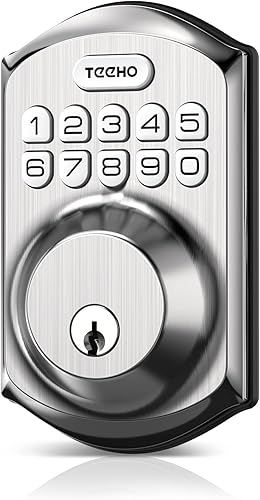
The TEEHO TE001 is a keypad deadbolt designed for front doors, back doors, garages and rental properties where keyless convenience is a priority. It is ideal for families, roommates and hosts who want to assign personal codes without copying or managing physical keys.
Standout features include 20 programmable user codes, a one-time PIN that auto deletes after use, and anti-peep protection that accepts random digits before and after the real code. Auto lock is adjustable from 10 to 99 seconds, one touch locking secures the door in two seconds, and real world feedback highlights a responsive keypad and dependable daily operation.
Built from sturdy aluminum alloy in a satin nickel finish, the lock feels solid and looks clean on modern doors. IP54 weather resistance handles rain and temperature extremes from minus 22F to 158F, while the backlit keypad and optional mute mode make nighttime entry quiet and easy.
There are a few tradeoffs to note. It runs on four AA batteries which are not included and needs periodic replacement, and it only fits standard 2-1/8 inch door holes so 38mm doors are not compatible. The ANSI Grade 3 rating provides reliable residential security, but it is not the highest commercial grade.
Overall, the TE001 delivers excellent value for anyone wanting simple, secure keyless entry without a complex smart home system. If you want affordable, family friendly access control with proven everyday features, it is an easy recommendation.
Pros
- Very fast fingerprint unlocking that becomes more accurate with use
- Simple 15-minute DIY installation with universal fit for standard interior doors
- Multiple unlock methods including fingerprint, passcode, app, voice and physical key
- Comprehensive app features with remote management, real-time alerts and auto-lock
- Clean modern design with fingerprint-resistant matte anodized aluminum finish
Cons
- Designed for interior doors only and not recommended for front exterior entry
- No support for Apple HomeKit, Matter or IFTTT and limited to 2.4GHz WiFi, plus rekeying is not supported
- Keypad lights and sounds may activate when closing the door and heavy daily use can reduce battery life
The eufy FamiLock C32 is a lever-style fingerprint smart lock designed specifically for interior doors such as bedrooms, offices, garages and storage rooms. It is best for families, roommates or small offices that want keyless privacy and easy access control without replacing a primary exterior deadbolt.
In daily use, the 0.3-second fingerprint sensor feels quick and forgiving thanks to 360-degree recognition and a self-learning AI that adapts to different users. Built-in WiFi allows true remote control through the eufy app, letting you create and share up to 100 passcodes, grant temporary access and receive real-time notifications without an extra bridge.
The lock has a modern minimalist oval design with a matte anodized aluminum finish that resists fingerprints and looks clean on interior doors. Installation is straightforward with just a screwdriver and standard door prep, and the interior handle includes a handy privacy button that many competing interior locks lack.
There are some tradeoffs to note. It is not rated for exterior front door use, connects only on 2.4GHz WiFi and does not support HomeKit, Matter or IFTTT. Some users also notice soft internal mechanical noise and keypad illumination when closing the door, which is normal operation but may take getting used to.
Overall, the FamiLock C32 delivers fast, flexible keyless convenience and solid app-connected management for interior spaces. If you need a reliable, voice-compatible lock for private rooms rather than a heavy-duty entry lock, it offers excellent everyday value and ease of use.
Model: eufy FamiLock C32 T85L1, Lever smart lock in Black, oval aluminum body with matte anodized finish.
Unlock Methods: Fingerprint up to 50 users, passcode up to 100, eufy app, Alexa and Google voice, physical keys, anti-peep code and USB-C emergency power.
Connectivity: Built-in 2.4GHz WiFi, eufy Security app, no hub required. Not compatible with HomeKit, IFTTT or Matter.
Power: 4 AA batteries included for about 5 months of use, USB-C port for emergency power only, low battery alerts at 20 percent.
Fit and Durability: Fits bore hole 2 1/8 inch, backset 2 3/8 or 2 3/4 inch, door thickness 1 3/8 to 2 1/6 inch, wood or metal doors. IP53 water resistance, auto-lock with countdown and silent unlocking.
Pros
- Multiple unlock methods including fingerprint, keypad, app, voice and mechanical key for maximum flexibility
- Built-in WiFi eliminates need for separate bridge or hub and simplifies setup
- App provides real time control of users, codes, fingerprints and access history
- Includes matching handle set and installs with just a screwdriver on most standard doors
- Strong customer support and consistently praised ease of installation in reviews
Cons
- Requires 8 AA alkaline batteries that are not included and will need periodic replacement
- Connects only to 2.4GHz WiFi, not 5GHz networks, which may require router settings adjustment
- Fits doors 1-3/8 to 1-3/4 inches thick only, so thicker or nonstandard doors are not compatible
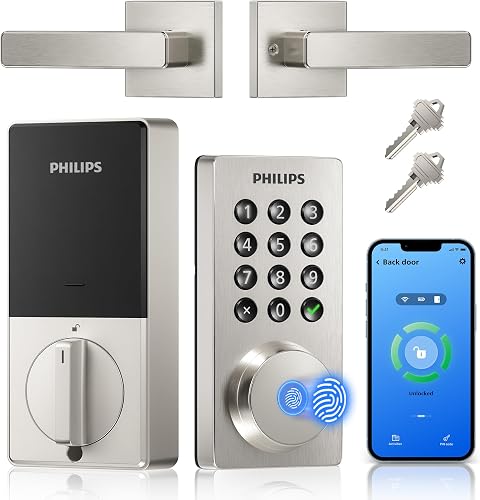
The Philips DDL242X-1HW 4200 Series is a full front door smart lock system that combines a WiFi deadbolt and matching handle set in Satin Nickel. It is designed for homeowners, families and rental managers who want keyless convenience without adding a separate hub or bridge.
Real world performance centers on speed and flexibility. The 0.3 second fingerprint reader, backlit keypad with anti peeping protection, app remote control and Alexa or Google voice commands give you five ways to enter. The app makes it easy to create permanent or temporary codes, review access history and set auto lock from 0 to 180 seconds.
Design is modern and solid with an aluminum build, clean lines and a slim profile that upgrades curb appeal. The raised keypad is easy to use in low light and for low vision users, while the included handle set creates a coordinated look without buying extra hardware.
There are a few tradeoffs to consider. It needs eight AA batteries, supports only 2.4GHz WiFi and fits a specific door thickness range. Some users note occasional quirks where a fingerprint needs an extra tap on the checkmark to confirm.
Overall, this Philips smart lock delivers excellent value with fast biometrics, true remote access and versatile code management. If you want a secure, easy to install, all in one smart lock for a busy household or rental, it is an easy recommendation.
Model: Philips DDL242X-1HW 4200 Series, Style: WiFi Smart Lock with Handle, Color: Satin Nickel, Material: Aluminum, Dimensions: 2.7 x 0.73 x 5.72 inches.
Lock Type: Biometric, Deadbolt, Keypad, WiFi Smart Lock. Connectivity: WiFi 2.4GHz and Bluetooth, Controller: Alexa, Google Assistant, iOS, Android. Control Methods: App, Push Button, Voice, Remote.
Features: Built-in WiFi with no hub, 0.3s fingerprint, backlit keypad, anti peeping password, anti drill, auto lock, app remote control, access history. Power: 8 x AA alkaline batteries not included.
Included: Philips 4200 Series WiFi Smart Lock x1, Door Lever x2, Latch Assembly, Mounting Screws and Hardware, User Manual, 2 Mechanical Backup Keys. Door Compatibility: 1-3/8 to 1-3/4 inches thick.
Choose this lock if you want remote app control without buying a hub, plus fingerprint and code options for family and guests. It is especially useful for rentals thanks to one time and recurring codes.
Before buying, confirm your door thickness and that you have a stable 2.4GHz WiFi signal at the door. Plan for eight AA batteries and keep the two backup keys in a safe place for power loss.
Installation takes minutes with a screwdriver for most standard doors. Hold the reset button for five seconds to activate, then follow the in app setup and watch the installation video for alignment tips.
Pros
- Seven versatile unlock methods to suit every family member and situation
- Fast and secure biometrics with AES-128 encryption stored locally on device
- True Matter over WiFi integration, no proprietary bridge required
- Easy 15-minute DIY install with IP65 weather rating and BHMA tested durability
- Reliable touchless options and remote management via the SwitchBot app
Cons
- Must use the included SwitchBot lock cylinder, existing cylinders are not compatible
- Face and palm vein setup can be sensitive to positioning and requires a clean sensor
- Larger matte black housing may look bulky on smaller or traditional style doors
The SwitchBot Lock Vision Pro is a flagship smart deadbolt that combines 3D face recognition, palm vein scanning and fingerprint access in one unit. It is designed for families and busy households that need flexible, hands-free entry for members of all ages.
Standout performance comes from its triple biometric system and instant auto-lock. Face unlock works in complete darkness in under a second, palm vein offers hygienic touchless entry, and fingerprint reads in 0.3 seconds. Real-world use shows smooth day-to-day operation, remote management and geo-fencing unlock via the app.
Build quality feels premium with a sturdy metal matte black finish and compact 7 x 3 inch profile. The unit is IP65 rated and BHMA tested for security and durability, and installation takes about 15 minutes with just a Phillips screwdriver on most US doors.
There are a few tradeoffs to consider. The lock requires its own cylinder so you cannot reuse your existing one, and some users report the face and palm setup can be finicky if the sensor is not positioned correctly. The larger exterior assembly also needs adequate door clearance.
Overall, the Lock Vision Pro is one of the most feature complete smart locks available, offering exceptional convenience and platform support. If you want a future proof, Matter compatible deadbolt with multiple biometric options and no hub, it is an excellent upgrade from a standard keypad lock.
Model: SwitchBot Lock Vision Pro W9022000, Matte Black, Metal construction, 7 x 3 x 1.2 inches, 1.2 pounds.
Access Methods: 3D structured light face recognition, palm vein (3 to 10 inches), fingerprint (90 prints), PIN, NFC card (up to 100), app, physical key and geo-fencing via Bluetooth.
Connectivity: WiFi direct, no hub required, Matter over WiFi, works with Apple Home, Siri, Alexa, Google Home and Home Assistant.
Power: 10,000mAh rechargeable Li-Po battery up to 12 months, CR123A backup for 500 unlocks, USB-C emergency power, operates down to -4°F.
Installation: Fits US doors 35 to 55mm thick, crossbore 38/54mm, backset 60/70mm, IP65 rated, includes latch accessories and user manual.
Pros
- Supports 50 user codes plus master code for easy family or rental management
- Durable heavy duty metal construction with matte black plated finish and silicone grip
- IP65 waterproof and wide temperature design for exterior and interior doors
- Long 18 month battery life with USB Type-C backup prevents lockouts
- Simple screwdriver installation works for left and right handed doors
Cons
- Requires 4 AAA batteries and USB Type-C cable which are not included
- No WiFi, Bluetooth or smartphone app for remote control
- Knob style can be less ergonomic than lever handles for users with limited hand strength
The iulock IU-30 is a keypad and key door knob that combines code entry with traditional key backup. It is ideal for homes, rentals, offices and garages where multiple users need convenient access without sharing physical keys.
It stores one master code and 50 user codes from 1 to 15 digits, with anti-peep technology that allows random digits before or after the real code. Auto-lock secures the door after 4 seconds by default and can be customized from 2 seconds to 12 hours, while two passage modes keep the door unlocked when needed.
Built with heavy duty metal and a matte black plated finish, the knob includes a removable silicone grip and rosette rubber seals for dust and rain protection. The IP65 waterproof design and minus 22F to 176F temperature range ensure reliable performance on wood, metal and screen doors in sun, rain or cold.
The backlit keypad and silent mode make nighttime entry discreet, and the USB Type-C emergency power port prevents lockouts if batteries deplete. On the downside, it lacks WiFi or app connectivity, AAA batteries are not included, and the knob form factor may be less accessible than a lever for some users.
Overall, the IU-30 delivers flexible keyless security, durable weather resistance and simple installation at a practical price point. It is a smart choice for anyone who wants reliable code access and auto-lock peace of mind without complex smart home integration.
Model: IU-30 Matte Black by iulock, Keypad and Key Smart Door Knob Lock
Access Methods: 1 master code, 50 user codes, code length 1 to 15 digits, 2 KW1 compatible keys, anti-peep code protection
Power: 4 x AAA alkaline batteries for up to 18 months, low battery alarm 2 months in advance, USB Type-C emergency backup
Lock Functions: Auto-lock default 4 seconds adjustable 2 seconds to 12 hours, two passage modes, silent mode, backlit keypad
Fitment: Door thickness 1-3/8 to 2-1/2 inch, adjustable latch 2-3/8 or 2-3/4 inch, rosette diameter 3-1/8 inch, knob length 2-3/4 inch
Durability: IP65 waterproof, operating temperature minus 22F to 176F, heavy duty metal with plated matte black finish, silicone grip and rosette rubber seals
Pros
- Fast and accurate fingerprint reader highly praised for reliability
- Multiple unlock and lock options provide excellent everyday flexibility
- Simple DIY installation with app based user management and access logs
- Durable aluminum alloy construction with weather resistance
- Useful auto lock and passage mode for busy households
Cons
- Remote access, real-time alerts and voice control require Yamiry gateway sold separately
- Batteries not included and Bluetooth only connection has limited range without gateway
- Some users report initial Bluetooth pairing can be tricky and requires close proximity to router for setup
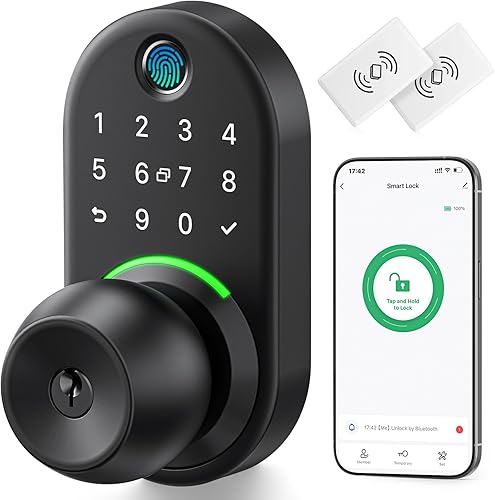
The Yamiry YR05 is a modern keyless door knob designed to replace a standard interior or exterior knob while keeping your existing deadbolt. It is built for families, busy households and short term rental hosts who need flexible, key free access without complex wiring or door modifications.
In real world use, the AI fingerprint sensor stands out for its 0.3 second unlock speed and high accuracy, a feature reviewers consistently praise for hands full convenience. The anti-peep keypad, app control via Bluetooth, and support for 50 codes and fingerprints make daily access and guest management simple, while auto lock and passage mode add practical automation.
Design and build quality feel solid thanks to the aluminum alloy body with a matte black brushed finish and waterproof keypad. The round handle is compact, the backlit keypad is easy to read in the dark, and the package includes two physical keys and two key fobs for backup access.
Drawbacks center on connectivity, as WiFi features like remote control, voice control with Alexa and Google Assistant, and push notifications all require a separate Yamiry gateway. You will also need to supply four AA batteries, and Bluetooth setup can require extra steps if your phone is far from the lock.
Overall, the YR05 delivers strong value as a versatile, easy to install smart knob with reliable fingerprint performance and thoughtful security features. It is a smart upgrade for anyone wanting keyless convenience, customizable access and auto lock peace of mind without replacing their deadbolt.
Model: Yamiry YR05 Smart Door Knob Lock, Matte Black, Aluminum Alloy
Unlock Methods: Fingerprint, Keypad Code, App via Bluetooth, Key Fob, Physical Key
Lock Methods: Auto Lock, App Lock, Long Press Check Mark Button
App Features: User management, access logs, one-time and recurring codes, passage mode, silent mode
Power: 4 x AA batteries not included, low battery alarm, emergency USB backup power
Compatibility: Most US standard doors, works with existing deadbolt, voice control via gateway
Pros
- Versatile 8-in-1 unlocking options for flexible family or tenant access
- Highly rated fingerprint reader is fast, accurate and more tolerant of moisture than many competitors
- Illuminated keypad is responsive and easy to see at night
- Sturdy zinc construction with matte black finish and reversible handle design
- Simple DIY installation fits standard American doors without modifications
Cons
- Wi-Fi remote control, Alexa voice control and real-time logs require G2 Wi-Fi Gateway sold separately
- Powered by 4 AA batteries not included and is not a motorized auto-locking deadbolt
- IP64 rating handles rain and dust but is not fully waterproof for fully exposed locations
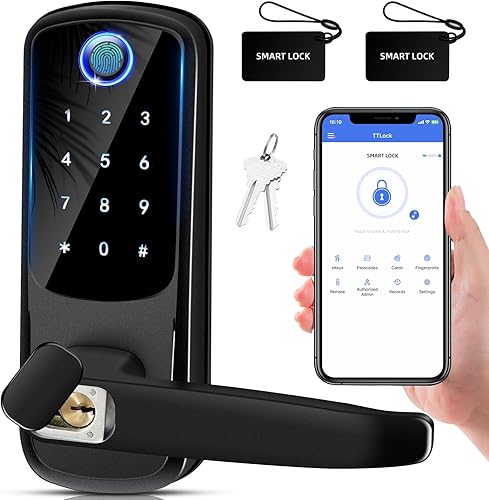
The MSR X6 H1 is a modern smart door lock with integrated handle designed to replace standard knobs, levers and deadbolts on American doors. It is ideal for families with children or seniors, rental hosts and small offices that need flexible keyless access for multiple users.
In real world use, the 8-in-1 system stands out with fingerprint, touch keypad, IC card, mechanical key and Bluetooth app options. Reviewers consistently praise the fast, accurate fingerprint reader that works even with slightly damp fingers and the responsive illuminated keypad that is easy to use in low light.
Design and build quality are solid for the category, with a zinc body, matte black finish and rectangular modern style. The reversible handle fits left or right handed doors, while IP64 water resistance and a -35F to 122F operating range help it endure cold, heat and rain, supported by low battery alerts and Type-C emergency power.
Drawbacks are worth noting before buying. Remote app control, Alexa voice commands and live access logs only work with the G2 Wi-Fi Gateway sold separately, and Bluetooth range is limited without it. It is also not a fully motorized deadbolt so you manually operate the handle, and it requires four AA batteries that are not included.
Overall, the MSR X6 H1 delivers impressive versatility, dependable biometric performance and truly easy installation. If you want an affordable, family friendly upgrade to keyless security without hiring a locksmith, it is a strong and practical choice.
Pros
- Fast and accurate fingerprint reader with multiple backup entry methods
- Simple DIY installation that fits most standard doors
- Excellent access management for families, offices and Airbnb rentals
- Smart integration with app, web portal, Alexa and Google Home via Gateway
- Durable zinc build with weather resistance, auto-lock and voice feedback
Cons
- Remote access and voice control require separate Sifely WiFi Gateway purchase
- No built-in WiFi, Bluetooth only without the Gateway accessory
- Initial app and code programming can take time to learn for new users
The Sifely S is a lever handle smart lock designed to replace traditional keys with fingerprint, keypad, fob, app and mechanical key access. It is built for busy families, households with kids or elderly members, and Airbnb or rental hosts who need simple, flexible entry control without locksmith installation.
In daily use, the fingerprint sensor unlocks quickly with a single touch, while the backlit keypad supports anti-peeping codes for added privacy. The Sifely app makes it easy to create permanent, timed or one-time codes, view access logs and enable auto-lock, and pairing the optional WiFi Gateway unlocks remote control and voice commands.
Built from zinc with a satin nickel finish, the lock feels solid yet modern and fits most standard doors with a reversible handle for left or right opening. It is IP65 rated for weather resistance and operates in a wide temperature range, while the touchscreen keypad and voice feedback keep operation intuitive for all ages.
The main limitation is that remote access, voice control and web portal management require the separate Sifely Gateway, as this model connects via Bluetooth only. Some users also note a short learning curve when programming advanced features and managing multiple user codes for the first time.
Overall, the Sifely S delivers strong value as a secure, versatile keyless lock that blends convenience with rental ready management tools. For homeowners and hosts who want reliable fingerprint entry and easy DIY installation, it is a smart and practical upgrade.
Model: Sifely S Smart Lock, Lever Lock style
Unlock Methods: Fingerprint, Passcode, Key Fob, Card, App, Mechanical Key
Connectivity: Bluetooth, WiFi with optional Sifely Gateway
Compatibility: Alexa, Google Home via Gateway, Sifely App and Web Portal
Features: Auto-Lock, One-Touch Lock, Anti-Peeping Password, Back-Lit Touchscreen, Voice Feedback
Power: 4 x AA batteries for up to one year, emergency power via power bank
Durability: IP65 weather resistant, operating range 14F to 158F, Zinc construction, Satin Nickel finish
Dimensions: 7 x 3 x 1.12 inches, reversible handle for left and right doors
Pros
- Versatile unlock options suit different family members and guests
- Built-in Wi-Fi enables remote control and notifications without a hub
- Supports up to 100 passcodes and multiple fingerprints for shared access
- Auto-Lock and Away Mode add convenient, extra security
- Backlit touchscreen and voice control are helpful when hands are full
Cons
- Only supports 2.4GHz Wi-Fi and works best within 65 feet of the router
- No door sensor, so Auto-Lock relies on a timer rather than door position
- Batteries not included and requires AA alkaline LR6 batteries only
The Philips DDL242X-1HW is a Wi-Fi connected smart deadbolt designed for keyless convenience at the front door. It is aimed at families, busy professionals and rental hosts who want flexible access without carrying keys or installing an extra hub.
Standout features include 5-in-1 unlocking, built-in Wi-Fi remote access, and voice control through Alexa and Google Assistant. In daily use, fingerprint unlock is fast for quick exits, while the app makes it easy to share timed or one-time codes and receive real-time alerts and access history.
Built from aluminum with a brushed matte black finish, the lock measures 6 x 2 x 1.5 inches and weighs 1.4 pounds. The backlit touchscreen is easy to read at night, and the design fits most standard doors from 1-3/8 to 2 inches thick with a straightforward screwdriver installation.
There are some tradeoffs to consider. It only connects on 2.4GHz networks and needs a stable connection within about 65 feet, and it lacks a door position sensor so auto-lock is time based from 10 to 180 seconds. You will also need to supply your own AA alkaline batteries.
Overall, the DDL242X-1HW delivers strong value for keyless security with remote management, fingerprint convenience and thoughtful safety features like Anti-Peeping Password and Away Mode. If you want a versatile, app-controlled deadbolt without a hub, it is a practical and user friendly choice.
Model DDL242X-1HW in matte black with brushed aluminum finish. Deadbolt style with keypad, fingerprint reader and app, remote and voice control via Alexa and Google Assistant.
Connectivity is built-in Wi-Fi on 2.4GHz only, no hub required. Control methods include app, passcode, fingerprint, physical key and voice. Supports up to 100 custom passcodes plus unlimited one-time and scheduled codes.
Security features include Anti-Peeping Password, Auto-Lock timer from 10 to 180 seconds, Away Mode and real-time alerts with access history. Fingerprint access stores multiple prints for family use.
Dimensions are 6 x 2 x 1.5 inches and weight is 1.4 pounds. Compatible with doors 1-3/8 to 2 inches thick. Power requires AA alkaline LR6 batteries, not included.
Buying Guide: How to Choose Smart Lock for Seniors for Seniors With Balance Issues
Not every smart lock is equally senior friendly, especially when balance is a concern. You want a lock that lets you enter quickly, stays locked without extra steps, and gives clear confirmation so you do not need to double back. Before you make a safety related change for a senior in your care, it is wise to consult a doctor, occupational therapist, or physical therapist for personalized guidance. The four criteria below will help you compare the models in our list with stability and confidence in mind.
Hands-Free and Low-Effort Unlock Methods
The best unlock method for balance issues is the one that keeps your feet planted and your hands free. Look for locks that offer palm vein, face recognition, or fingerprint access so you do not have to set down bags or steady yourself on the door frame while typing. The SwitchBot Lock Vision Pro Smart Lock is a strong example, with 3D face recognition that works in total darkness and palm vein reading from 3 to 10 inches without contact.
It also stores up to 90 fingerprints for family members, while the Lockin Veno Smart Lock, Palm Vein offers contactless palm vein and fingerprint unlocking in under a second with high accuracy even with wet or worn hands. If fingerprints are unreliable for you, a large backlit keypad with anti-peep protection, like on the TEEHO TE001 Keyless Entry Deadbolt with Keypad or the iulock Keypad & Key Smart Door Lock, lets you enter a code without precise finger placement. For added context on entry support, see our medline car handle assist review for elderly for ideas on stabilizing transitions.
Auto-Lock and Remote Monitoring for Safety
Standing at the door to confirm it locked can be tiring and risky if you have limited balance. Choose a lock with adjustable auto-lock so the deadbolt secures itself seconds after you close the door, without requiring you to turn around or push hard. The Philips WiFi Keypad Door Lock with Handle lets you set auto-lock from 0 to 180 seconds in the app, while the Philips Wi-Fi Smart Deadbolt Lock offers a 10 to 180 second range and real time alerts so you know the door is secure.
Remote management is equally valuable for seniors who may not want to get up to answer the door. Built-in WiFi models like the eufy Security Smart Lock FamiLock C32 and the SwitchBot Lock Vision Pro Smart Lock connect directly without a hub, letting a family member lock or unlock from a phone and check access history. If you use voice control, Alexa or Google Assistant integration can lock the door or check status hands free, which reduces trips across the house. Learn more about accessible home monitoring in our best package delivery box for elderly with hearing loss guide.
Easy Installation, Clear Feedback, and Visibility
A lock should not require awkward bending or prolonged standing to install or use. Most of the models here install with just a screwdriver in about 15 minutes and fit standard US doors, which limits time spent on a step stool. The Fingerprint Smart Door Lock with Handle & Keypad and the Keypad Smart Door Knob Lock both offer reversible handles for left or right handed doors and simple app setup, while the Smart Door Lock with Handle is designed to replace existing hardware without extra drilling.
Visibility and feedback matter when you cannot lean in close. Look for a backlit touchscreen or keypad with large numbers, plus audible prompts or app notifications that confirm locking. The Philips Wi-Fi Smart Deadbolt Lock has a backlit touchscreen and instant notifications, and the TEEHO TE001 Keyless Entry Deadbolt with Keypad includes a low battery indicator and one touch lock by holding any key for two seconds. These cues let you confirm success from a comfortable standing position without straining. For broader mobility planning, our ADA cane requirements for seniors aging in place explains supportive standards.
Battery Reliability and Emergency Access
A lock that dies unexpectedly can leave you standing outside longer than is safe. Prioritize models with long battery life, clear low battery alerts, and emergency power options. The SwitchBot Lock Vision Pro Smart Lock offers up to 12 months on its 10,000mAh battery with a CR123A backup and USB-C emergency power, while the Lockin Veno Smart Lock, Palm Vein provides up to 7 months and a USB-C port for a power bank. The eufy Security Smart Lock FamiLock C32 runs about five months on four AA batteries and also supports USB-C backup.
Emergency access should be simple and not require fine motor skills. All picks include mechanical keys, and several add additional backups like IC cards or fobs that are easier to hold than a small key. The iulock Keypad & Key Smart Door Lock includes two traditional keys and a Type-C USB backup, and the Smart Door Lock with Handle supports fingerprints, codes, cards, and app sharing for caregivers. If you want to compare low maintenance support options, our medline bed wedge pillow review for elderly highlights other stability focused upgrades for the home.
Who Shouldn’t Buy This
A full smart deadbolt or handle set is not a good fit for renters who cannot replace existing hardware, doors that are thinner than 1-3/8 inches or thicker than 2-1/2 inches, or anyone who needs a lock without any app or code setup at all. It is also not ideal for exterior gates or sliding doors, and the eufy Security Smart Lock FamiLock C32 specifically is designed for interior doors and should not be used as a front door lock. If you need a non electronic solution or a lock that works without batteries, a traditional lever with a simple key may be a better choice.
Final Thoughts
For seniors who need the most hands free stability, the SwitchBot Lock Vision Pro Smart Lock stands out for face and palm vein access with instant auto-lock, while the TEEHO TE001 Keyless Entry Deadbolt with Keypad offers a simple, reliable keypad with auto-lock and backup keys for everyday ease. Choose the level of contactless convenience that best supports your balance and daily routine.
Frequently Asked Questions
What is the easiest smart lock to use for seniors with balance issues in 2026?
The easiest options minimize time standing at the door and eliminate fine key handling. In 2026, contactless choices like palm vein and 3D face recognition, as seen on the SwitchBot Lock Vision Pro Smart Lock and Lockin Veno Smart Lock, Palm Vein, let you unlock with a hand wave or by simply approaching. If you prefer a code, choose a model with a large backlit keypad and anti-peep protection such as the TEEHO TE001 Keyless Entry Deadbolt with Keypad, which also offers one touch locking.
Do smart locks lock automatically so seniors do not have to turn around?
Yes, many of the locks in this list offer adjustable auto-lock so you do not need to push, pull, or check the door. The Philips WiFi Keypad Door Lock with Handle and Philips Wi-Fi Smart Deadbolt Lock let you set auto-lock from 10 to 180 seconds, while the SwitchBot Lock Vision Pro Smart Lock uses a built-in sensor to lock instantly when the door closes. You can also enable notifications in the app to confirm the door is secured without walking back.
What happens if the batteries die while a senior is outside?
All of the recommended locks give you a backup so you are not stranded. Most include two mechanical keys and a low battery alert that warns you well before power is low, and several add USB-C emergency power so a small power bank can provide enough charge to enter with a code or fingerprint. For example, the Lockin Veno Smart Lock, Palm Vein, eufy Security Smart Lock FamiLock C32, and iulock Keypad & Key Smart Door Lock all support USB-C backup. For extra stability during entry and exit, you may also find our NOVA gait belt review for elderly useful for caregiver assisted transfers.
Are fingerprint locks reliable for seniors with arthritis or dry skin?
Fingerprints can be less reliable if skin is very dry, worn, or affected by arthritis, which is why having multiple unlock methods matters. Models like the Fingerprint Smart Door Lock with Handle & Keypad and Keypad Smart Door Knob Lock store many fingerprints and also offer codes, fobs, and app access so you have alternatives on difficult days. If fingerprints are often inconsistent for you, prioritize palm vein or face recognition, or a large keypad with anti-peep codes that does not require precise finger placement.
Browse more picks in our Smart Locks & Entry category, or see our related guide on Package Delivery Boxes for Hearing Loss in 2026.




Write Your Review
No reviews yet. Be the first to share your experience!